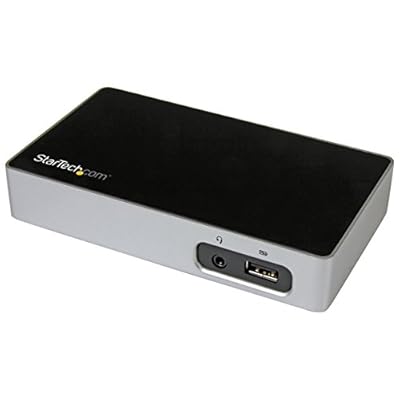

DVI Docking Station for Laptops - USB 3.0 - Universal Laptop Docking Station - DVI Laptop Dock USB3VDOCKD,Black & silver
This DVI docking station for laptops offers a cost-effective way to create a simpler but highly functional workstation.
DVI Docking Station for Laptops - USB 3.0 - Universal Laptop Docking Station - DVI Laptop Dock USB3VDOCKD,Black & silver

DVI Docking Station for Laptops - USB 3.0 - Universal Laptop Docking Station - DVI Laptop Dock USB3VDOCKD,Black & silver

Fora de stock
EUA Importado da loja USA
Os nossos principais Parceiros Logísticos
  • fedex
  • dhl
This DVI docking station for laptops offers a cost-effective way to create a simpler but highly functional workstation.
Garantia U-Care:
Nenhuma
Selecione um plano
fast shipping

Fast
Shipping

free return

Devolução
gratuita*

Embalagem Segura

Embalagem Segura

Produtos 100% Originais

Produtos 100% Originais

pci-dss

Certificação PCI DSS

iso certified

Certificação ISO 27001


paypal payment
visa payment
mastercard payment
Note: Step Down Voltage Transformer required for using electronics products of EUA store (110-120). Recommended power converters Compre Agora.

O que se Destaca

Universal Compatibility
This docking station supports a wide range of laptops and operating systems, ensuring seamless integration and versatility for users needing multiple device connections.
Multiple Ports
Equipped with various USB 3.0 ports, DVI output, and more, it allows simultaneous connection of multiple peripherals, enhancing productivity for professionals and multitaskers alike.
High-Quality Performance
With support for 1080p video output, it delivers crisp visuals and high-performance capabilities for presentations and multimedia tasks, ideal for business use and content creation.

Detalhes do produto

Shop DVI Docking Station for Laptops - USB 3.0 - Universal Laptop Docking Station - DVI Laptop Dock USB3VDOCKD,Black & silver online at a best price in São Tomé and Príncipe. B013TPIC4S
BrandStarTech-com
ColorBlack & silver
Hardware InterfaceUSB 3.0
Compatible DevicesApple MacBook Air M1/M2, Apple MacBook Pro 13 M1/M2, Apple MacBook Pro 14 M1 Pro/M2 Pro, Apple MacBook Pro 16 M1 Pro/M2 Pro/M1 Max/M2 Max, Apple MacBook Pro 15 2019/2018/2017/2016, Apple MacBook Pro 13 2020 Intel/M1, Apple MacBook Pro 13 2021 M1 Pro/M1 Max, Apple MacBook Air 2022 M2, Apple MacBook Pro 14 2021 M1 Pro/M1 Max, Apple MacBook Pro 16 2021 M1 Pro/M1 Max, HP Spectre x360 13-aw0000/13-df0000/13-af0000/13-ap0000/13-ba0000/14-ea0000/14-df0000/14-cd0000/14-bc0000/14-bd0000/15-df0000/15-eb0000/15-bl0000/15-ds0000/15-ch0000, HP Elite Dragonfly G2 2B5G1AV/2B5G2AV/2B5G3AV, HP Elite Dragonfly G3 3B5G1AV/3B5G2AV, HP EliteBook 830 G7 Intel/AMD, HP EliteBook 830 G8 Intel/AMD, HP EliteBook 840 G7 Intel/AMD, HP EliteBook 840 G8 Intel/AMD, HP EliteBook 850 G7 Intel/AMD, HP EliteBook 850 G8 Intel/AMD, HP Envy 13-ba0000/13-df0000/13-ap0000/14-eb0000/14-df0000/15-df0000/15-cd0000/15-bc0000, HP Envy x360 13-bd0000/13-dq0000/13-cb0000/14-bd0000/14-ce000... See more
Total USB Ports3
Number of Ports3
Item Weight12.32 ounces (349.27 grams)
Wattage20
Global Trade Identification Number00065030861816
UPC065030861816

Quem Deverá Comprar?

Suitable For
  • Frequent Travelers

    Ideal for users who need a compact docking station to enhance productivity on the go with multiple ports.

  • Office Workers

    Perfect for professionals requiring multiple monitors and peripherals connected to their laptop for improved workflow.

  • Tech Enthusiasts

    Great for users needing versatility in connectivity options for various devices, enhancing overall computing experience.

Not Suitable For
  • Gaming Users

    May not support high-performance gaming needs due to limited graphics output and potential lag with multiple displays.

DESCRIÇÃO DO PRODUTO

DVI Docking Station for Laptops - USB 3.0 - Universal Laptop Docking Station - DVI Laptop Dock USB3VDOCKD,Black & silver

Tem alguma Dúvida? Converse connosco

Perguntas e Respostas dos Clientes

  • pergunta: What are the key features of the StarTech.com DVI Docking Station for Laptops?

    Resposta: The StarTech.com DVI Docking Station features USB 3.0 connectivity, providing fast data transfer rates. It supports DVI output, allowing you to connect multiple monitors for enhanced productivity. With a universal design, this docking station is compatible with a variety of laptop brands, making it versatile for any setup. Additionally, it includes multiple USB ports for connecting peripherals such as keyboards and mice, making it ideal for both home and office environments.
  • pergunta: How do I set up the StarTech.com DVI Docking Station?

    Resposta: Setting up the StarTech.com DVI Docking Station is straightforward. Simply connect the docking station to your laptop using the USB 3.0 cable. Once connected, install any necessary drivers that may be prompted by your operating system. After installation, you can plug in your DVI monitor and peripherals. This setup is perfect for users who need to quickly transition from a mobile to a desktop experience, providing a seamless continuity in workflow.
  • pergunta: Can I use the DVI Docking Station with a Mac laptop?

    Resposta: Yes, the StarTech.com DVI Docking Station is compatible with Mac laptops. However, users may need to install specific drivers to ensure full functionality. This compatibility allows Mac users to expand their display options or easily connect additional devices. For those using design software or multitasking extensively, this docking station provides a dual-monitor setup that enhances productivity and improves workflow efficiency.
  • pergunta: What monitors are compatible with the DVI output of this docking station?

    Resposta: The DVI output of the StarTech.com DVI Docking Station is compatible with any monitor that has a DVI input, including DVI-D and DVI-I types. This wide compatibility ensures that you can connect a range of monitors for different applications. Whether you’re using a single monitor for general tasks or a dual-monitor setup for professional work, this docking station adapts to your needs and supports high-resolution displays, providing crisp and clear visuals.
  • pergunta: Does the StarTech.com DVI Docking Station support audio output?

    Resposta: The StarTech.com DVI Docking Station does not support audio output via DVI, as DVI primarily transfers video data. If you require audio functionality, consider using additional audio outputs on your laptop or employing external speakers connected directly to the docking station or your monitor. This setup is ideal for users focused on video performance, such as graphic designers, while still needing a reliable solution for audio through other channels.
  • pergunta: Can multiple monitors be connected to the StarTech DVI Docking Station?

    Resposta: Yes, you can connect multiple monitors to the StarTech.com DVI Docking Station, however, typically one monitor will use the DVI port while additional monitors can utilize USB connections, depending on your operating system's capabilities. This flexibility allows for a multi-display setup that enhances your workspace efficiency. Ideal for professionals who work with extensive data sets, coding, or creative projects, it enables easy navigation between applications.
  • pergunta: Is the StarTech.com DVI Docking Station backward compatible with USB 2.0?

    Resposta: Absolutely, the StarTech.com DVI Docking Station is backward compatible with USB 2.0 ports. While using a USB 3.0 connection will yield optimal performance in terms of data transfer speeds, connecting it to a USB 2.0 port will still function, although at reduced speeds. This backward compatibility ensures that you can use the docking station with older devices without needing to upgrade your hardware immediately, providing flexibility in device use.
  • pergunta: What operating systems are supported by the StarTech.com DVI Docking Station?

    Resposta: The StarTech.com DVI Docking Station supports multiple operating systems, including Windows and macOS. It is advisable to check the specific driver compatibility for your OS version on the StarTech website. This support allows users across different platforms to leverage a universal docking solution that enhances their laptop capabilities, making it suitable for both casual users and professionals working in varied computing environments.
  • pergunta: How does the StarTech.com DVI Docking Station improve my workstation setup?

    Resposta: The StarTech.com DVI Docking Station enhances your workstation setup by providing connectivity options for multiple devices, allowing for greater organization and efficiency. It helps streamline your workspace by reducing cable clutter while offering the capability to easily connect your laptop to external displays and peripherals. This is particularly beneficial for users engaging in tasks requiring extensive multitasking, such as financial analysis or graphic design, where real estate on your screen is essential.
  • pergunta: Where can I buy the StarTech.com DVI Docking Station in São Tomé and Príncipe?

    Resposta: You can buy the StarTech.com DVI Docking Station for Laptops at Ubuy in São Tomé and Príncipe. Ubuy offers a convenient online shopping experience, allowing you to explore various options and ensure secure purchase. They provide detailed product information, helping you make an informed decision for your workspace needs.

StarTech.com Docking Stations Editorial Review

Nenhuma revisão editorial encontrada

Avaliações e Classificações dos Clientes

5.0
1 classificações de clientes
  • 5 Estrela
    100%
  • 4 Estrela
    0%
  • 3 Estrela
    0%
  • 2 Estrela
    0%
  • 1 Estrela
    0%

Avaliar este produto

Partilhe as suas ideias com outros clientes

Prós

  • Multiple display support
  • Fast USB 3.0 connections
  • Easy setup and installation
  • Compact and portable design
  • Universal compatibility with laptops

Contras

  • Limited audio output options.

Platform Trust & Buyer Confidence

trustpilot logo
4.3/5 9,000 + reviews
Read reviews
MT
Mohd
Verified buyer

“The product received very good packaging & safe…Thank You”

16 June 2026 · via Trustpilot
SJ
Shawati
Verified buyer

“Accurate delivery timing given”

16 June 2026 · via Trustpilot
YB
Youcef
Verified buyer

“Not madly expensive like I thought, and much quicker than promised.”

15 June 2026 · via Trustpilot
LM
Leila
Verified buyer

“Never dealt with Ubuy before, but everything worked out great. Seamless cross border purchasing and shipping. Thanks!”

6/7/2026 · via Trustpilot
KA
Kwame
Verified buyer

“The process was smooth, with clear communication and timelines. This was my 1st purchase and I am really impressed. I will definitely be coming back.”

12 June 2026 · via Trustpilot
Checkout Seguro Global Delivery Devoluções Fáceis Genuine Products

Informação importante

  • Limitações: para produtos expedidos internacionalmente, tenha em atenção que qualquer garantia do fabricante pode não ser válida; opções de serviço do fabricante podem não estar disponíveis; manuais de produtos, instruções e avisos de segurança podem não estar nas línguas do país de destino; os produtos (e materiais que o acompanham) pode não ter sido concebido em conformidade com as normas, especificações e requisitos de rotulagem do país de destino; e os produtos podem não estar em conformidade com a voltagem e outras normas elétricas do país de destino (requerendo assim o uso de um adaptador ou conversor caso seja apropriado). O destinatário é responsável por garantir que o produto pode ser legalmente importado para o país de destino. Quando encomenda à Ubuy ou aos seus afiliados, o destinatário é o importador de registo e deve estar em conformidade com todas as leis e regulamentos do país de destino.
  • Nem todos os produtos listados na Ubuy estão à venda, uma vez que a Ubuy é um motor de busca global. Os produtos estão sujeitos a leis de exportação/comércio.