0 ratings


Artigo n.º:
221578082
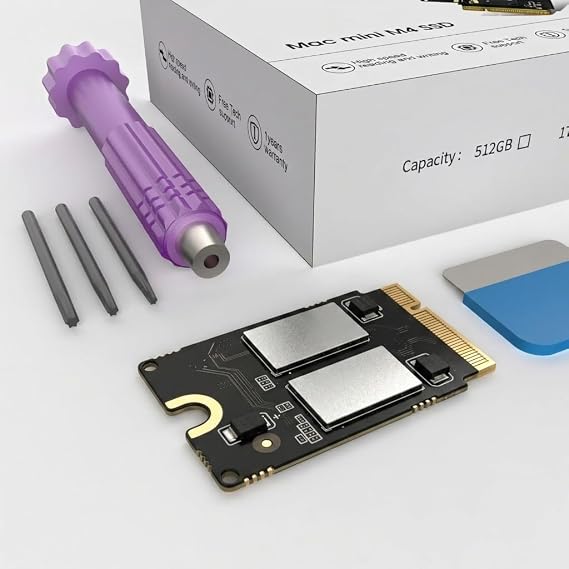
Mac mini M4 512GB SSD Upgrade Internal NVMe Hard Drive Replacement Kit for Mac mini M4, DIY Storage Expansion Solution (512, GB)
81% of respondents would recommend this to a friend
Artigo n.º:
221578082
STD 4058890
Detalhes do Preço
Excluindo custos de envio e alfandegários ( Os custos de envio e alfandegários serão calculados na finalização da compra )
*Todos os artigos serão importados de EUA
0 ratings
Escrever uma avaliação
Em stock
 Importado da loja USA
Encomende já e receba por volta de Terça-feira, Setembro 29
Transação segura
A Ubuy trabalha arduamente para proteger a sua segurança e privacidade. O nosso sistema avançado de segurança de pagamentos garante a confidencialidade ao encriptar as suas informações durante a transmissão, utilizando os protocolos AES (Normas de Encriptação Avançada) e SSL (Camada de Sockets Seguros). Os seus dados de pagamento estão 100% seguros, pois não partilhamos os seus dados de pagamento com vendedores terceiros.
Os nossos principais Parceiros Logísticos


This 2TB SSD, designed for the Mac Mini, offers massive storage for files, apps, and media.

Fast
Shipping

Devolução
gratuita*

Embalagem Segura

Produtos 100% Originais

Certificação PCI DSS

Certificação ISO 27001



Note: Step Down Voltage Transformer required for using electronics products of EUA store (110-120). Recommended power converters COMPRAR AGORA.


O que se Destaca
Easy DIY Installation
This kit provides a user-friendly approach for upgrading storage, allowing Mac Mini owners to confidently enhance their device performance without professional help.
High-Speed NVMe
The 1TB NVMe SSD delivers rapid data access and transfer rates, significantly improving overall system speed and responsiveness compared to traditional hard drives.
Storage Expansion
This solution addresses inadequate storage issues by providing ample space for files, applications, and media, effectively keeping your Mac Mini clutter-free and efficient.
Detalhes do produto
| Digital Storage Capacity | 2 TB |
| Hard Disk Interface | eSATA |
| Connectivity Technology | eSATA |
| Additional Features | Data Recovery Service |
| Hard Disk Form Factor | 2.5 inches |
| Compatible Devices | Macmini M4 |
| Specific Uses For Product | Personal |
| Read Speed | 3300 megabytes_per_second |
| Media Speed | 350 MB/s |
| Data Transfer Rate | 3500 megabytes_per_second |
| Form Factor | 2.5-inch |
| Hardware Connectivity | SATA 6.0 Gb/s |
| Hard-Drive Size | 512 GB |
| Number of Items | 1 |
| Unit Count | 1 Count |
| Brand | wusheation |
| Model Number | m4 |
| Hard Disk Description | Solid State Drive |
| Built-In Media | 1 |
| Model Name | M4 |
| Manufacturer | wusheation |
| UPC | 726899873296 |
| Installation Type | Internal Hard Drive |
| Color | M4 SSD-512GB |
| Enclosure Material | Nand Flash Memory |
| Special Feature | Data Recovery Service |
| Item Weight | 0.5 lbs (230 grams) |
Quem Deverá Comprar?

-
Power Users
Ideal for professionals needing fast, reliable storage for applications like video editing, graphic design, or software development.
-
DIY Enthusiasts
Perfect for those comfortable with hardware upgrades and seeking to enhance their Mac Mini's overall performance.
-
Storage Limited Users
Beneficial for users facing storage constraints, allowing for expanded capacity for files, applications, and media libraries.

-
Casual Users
Not suitable for average users with basic needs who do not require extensive storage or speed enhancements.
DESCRIÇÃO DO PRODUTO
Mac mini M4 512GB SSD Upgrade Internal NVMe Hard Drive Replacement Kit for Mac mini M4, DIY Storage Expansion Solution (512, GB)
Tem alguma Dúvida? Converse connosco
Perguntas e respostas do cliente
-
Pergunta:
What is the difference between the 2TB and 1TB SSD options for the 2025 M4 Mac Mini?
Resposta: The primary difference lies in storage capacity. The 2TB SSD option provides double the space compared to the 1TB variant, allowing users to store more applications, files, and high-resolution media. This becomes particularly beneficial for professionals in graphic design, video editing, or those who require extensive data storage for large projects. Choosing the right size is crucial based on your usage; for instance, gamers or content creators would likely prefer the 2TB option for ample space. -
Pergunta:
Can I install the 2TB SSD replacement myself in the 2025 M4 Mac Mini?
Resposta: Yes, installing a 2TB SSD replacement in the 2025 M4 Mac Mini can be done by individuals with basic technical skills. You'll need specific tools and follow a guide to access the internal components of the Mac Mini safely. This upgrade enhances performance significantly, especially for users who multitask or run heavy applications. However, if you're unsure, consulting a technician is a prudent choice to prevent any potential harm to the device. -
Pergunta:
Is the 2TB SSD replacement compatible with all versions of the 2025 M4 Mac Mini?
Resposta: The 2TB SSD replacement is specifically designed for the 2025 M4 Mac Mini. Before making a purchase, it's advisable to confirm compatibility by checking the specifications of your model. This compatibility ensures that you experience optimal performance and efficient data management. For example, users with the higher-end models will benefit from faster read and write speeds, crucial for demanding applications. -
Pergunta:
What performance improvements can I expect from upgrading to a 2TB SSD?
Resposta: Upgrading to a 2TB SSD can significantly enhance your Mac Mini's overall performance, including faster boot times, quicker application launches, and improved data transfer speeds. This is particularly noticeable for users who work with large files or complex software. For instance, a video editor might experience smoother playback and rendering times, greatly enhancing productivity. The additional storage also alleviates performance slowdowns associated with low disk space. -
Pergunta:
Are there any brands recommended for a 2TB SSD replacement for the 2025 M4 Mac Mini?
Resposta: Top brands like Samsung and Crucial are highly regarded for SSD replacements for the 2025 M4 Mac Mini. These brands are known for their reliability, performance, and quality of storage products. Selecting a reputable brand helps ensure that you receive a durable and efficient SSD, which is essential for preserving your data and providing consistent performance. For professionals, investing in a high-quality SSD can lead to long-term benefits and enhanced user experience. -
Pergunta:
What tools do I need to replace the SSD in a 2025 M4 Mac Mini?
Resposta: Replacing the SSD in a 2025 M4 Mac Mini typically requires a Torx screwdriver, a suction cup, and an anti-static wrist strap to prevent damage from static electricity. These tools facilitate safe access to the internal components, allowing you to complete the upgrade without mishaps. Ensuring you have the right equipment not only simplifies the procedure but also promotes safety throughout the installation process, ensuring your Mac Mini functions optimally post-upgrade. -
Pergunta:
Can a 2TB SSD help with data security on my Mac Mini?
Resposta: Yes, a 2TB SSD can enhance data security indirectly by providing ample space for regular backups and storage of essential files. Storing backups on a separate SSD reduces the risk of data loss due to hardware failure. Furthermore, SSDs typically offer encryption features that can safeguard sensitive information against unauthorized access. For users concerned about data integrity and security, investing in a quality SSD is a practical and proactive measure. -
Pergunta:
What are the best use cases for a 2TB SSD in a Mac Mini?
Resposta: A 2TB SSD is ideal for video editors, graphic designers, and gamers who require substantial storage for large files and applications. Professionals using resource-intensive software will find the extra space enhances their workflow efficiency and minimizes lag. Additionally, individuals who enjoy storing a vast library of games or multimedia content can benefit significantly, ensuring that their system runs smoothly without storage constraints. Overall, this upgrade fosters a better user experience across various professional and personal tasks. -
Pergunta:
How does the 2TB SSD upgrade affect battery life on Mac Mini?
Resposta: The SSD upgrade itself does not directly impact battery life, as the Mac Mini is typically connected to power. However, SSDs are generally more energy-efficient compared to traditional hard drives, which means less heat is generated, leading to improved overall system performance. For users performing data-intensive tasks, this efficiency can create a more comfortable operating environment and potentially extend the lifespan of the system. Consequently, while there may not be a direct correlation to battery life, overall efficiency is enhanced. -
Pergunta:
Where can I buy the 2025 M4 Mac Mini 2TB SSD replacement in São Tomé and Príncipe?
Resposta: You can purchase the 2025 M4 Mac Mini 2TB SSD replacement from Ubuy. Ubuy offers a wide selection of tech products and accessories, making it a convenient platform for purchasing your SSD upgrade. Their user-friendly interface also allows for easy navigation and comparison of various options available, ensuring that you find the right SSD to meet your needs efficiently.
wusheation Internal Components m4 Editorial Review
Nenhuma análise editorial encontrada
Avaliações e Classificações dos Clientes
1 classificações de clientes
-
5 Estrela
100%
-
4 Estrela
0%
-
3 Estrela
0%
-
2 Estrela
0%
-
1 Estrela
0%
Avaliar este produto
Partilhe as suas ideias com outros clientes
CONFIANÇA NA PLATAFORMA E SEGURANÇA DO COMPRADOR

JK
Jasmin
Comprador verificado
“Great products and very good service: very easy and very fast international delivery.”
9 September 2026 · via Trustpilot
AG
Anke
Comprador verificado
“Wonderful online shopping experience, smooth transaction from the start. Payment method works conveniently and delivery is unexpectedly fast and reliable. You go the extra mile for service. What makes this even more amazing, you deliver to Namibia. I will remain a happy Ubuy customer and will increase my purchases for sure! Thank you!”
10 September 2026 · via Trustpilot
H
Hazel
Comprador verificado
“Very easy to find the products what you need, and so fast delivery, that’s why I highly recommended to others costumers to used ubuy.”
10 September 2026 · via Trustpilot
O
Opaleye
Comprador verificado
“I received exactly what I ordered I was skeptical about your site because that was my first time to order. But the order came timely and neatly packaged. I was not disappointed. Thank you.”
11 September 2026 · via Trustpilot
AC
Adele
Comprador verificado
“Easy to find and order what you want on the website. Delivery is quick to the UK”
8 September 2026 · via Trustpilot
Checkout Seguro
Entrega Global
Devoluções Fáceis
Produtos Genuínos
Histórico de preços do produto
Informação importante
- Limitações: para produtos expedidos internacionalmente, tenha em atenção que qualquer garantia do fabricante pode não ser válida; opções de serviço do fabricante podem não estar disponíveis; manuais de produtos, instruções e avisos de segurança podem não estar nas línguas do país de destino; os produtos (e materiais que o acompanham) pode não ter sido concebido em conformidade com as normas, especificações e requisitos de rotulagem do país de destino; e os produtos podem não estar em conformidade com a voltagem e outras normas elétricas do país de destino (requerendo assim o uso de um adaptador ou conversor caso seja apropriado). O destinatário é responsável por garantir que o produto pode ser legalmente importado para o país de destino. Quando encomenda à Ubuy ou aos seus afiliados, o destinatário é o importador de registo e deve estar em conformidade com todas as leis e regulamentos do país de destino.
- Nem todos os produtos listados na Ubuy estão à venda, uma vez que a Ubuy é um motor de busca global. Os produtos estão sujeitos a leis de exportação/comércio.
STD 4058890
Encomende já e receba por volta de Terça-feira, Setembro 29
Este artigo não está restrito no meu país. (Clique no link acima se este artigo não estiver restrito no seu país, para que a nossa equipa o analise e permita.)
Qtd.:
Transação segura
Em conformidade com a norma PCI DSS e com certificação ISO 27001:2022, com pagamentos encriptados e proteção total do comprador em todas as encomendas.
Os nossos principais Parceiros Logísticos
Entrega internacional mais rápida
Recursos e benefícios
- Large 2TB capacity for extensive file storage.
- High-speed read/write speeds up to 3300 MB/s.
- Custom-designed M4 NVMe SSD for perfect compatibility.
- Seamless integration with Mac Mini M4.
- Rigorously tested for reliability and stability.
- Enhances boot times and app performance.
Ubuy Assurance
Experience worry-free shopping with 100% original products, PCI DSS-compliant payment security, ISO 27001-certified data protection, the fastest cross-border delivery, free returns *, and secure packaging on every order.