- Pagina inicial /
- Eletrónica /
- Computer Accessories /
- Computer Accessories & Peripherals /
- Computer Memory Card Accessories /
- Sintech PCIe 4.0 x4 to Oculink,Oculink SFF-86...
0 ratings

Artigo n.º:
120092433
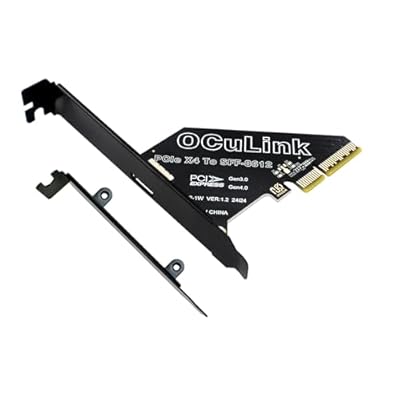
Sintech PCIe 4.0 x4 to Oculink,Oculink SFF-8611 to PCI-e Adapter Card with Low Profile Bracket for eGPU Dock Mimi Pc
Artigo n.º:
120092433
STD 737745
Price Details
Excluding Shipping & Custom charges ( Shipping and custom charges will be calculated on checkout )
*All items will import from EUA
0 ratings
Escreva um comentário
Em estoque
 Importado da loja USA
QTY:
Encomende já e receba por volta de Quarta-feira, Julho 08
Transação segura
A Ubuy trabalha arduamente para proteger a sua segurança e privacidade. O nosso sistema avançado de segurança de pagamentos garante a confidencialidade ao encriptar as suas informações durante a transmissão, utilizando os protocolos AES (Normas de Encriptação Avançada) e SSL (Camada de Sockets Seguros). Os seus dados de pagamento estão 100% seguros, pois não partilhamos os seus dados de pagamento com vendedores terceiros.
Os nossos principais Parceiros Logísticos


Transform your desktop with the Sintech Oculink Adapter for seamless connections to eGPU and external SSDs.

Fast
Shipping

Devolução
gratuita*

Embalagem Segura

Produtos 100% Originais

Certificação PCI DSS

Certificação ISO 27001


Note: Step Down Voltage Transformer required for using electronics products of EUA store (110-120). Recommended power converters Compre Agora.


O que se Destaca
High-Speed Connectivity
Supports PCIe 4X interface, ensuring rapid data transfer speeds for intense applications, enhancing overall system performance.
Versatile Compatibility
Designed for SFF-8611/8612 connectors, this adapter card seamlessly integrates with various hardware setups, offering flexible upgrade options.
Robust Design
Engineered for reliability, this adapter card ensures stable performance under heavy loads, delivering exceptional quality and long-term durability.
Detalhes do produto
| Item Weight | 0.2 lbs (90 grams) |
Quem Deverá Comprar?

-
Data Center Managers
Ideal for data centers needing efficient PCIe expansion for enhanced server connectivity and performance optimization.
-
System Builders
Perfect for custom PC builders incorporating additional storage or high-speed connections into their systems.
-
IT Professionals
Suitable for IT technicians requiring a reliable interface for connecting multiple devices with PCIe support.

-
Casual Users
Not suitable for everyday users who do not require advanced connectivity options or upgrades.
-
Budget-Conscious Buyers
May not fit those seeking low-cost solutions because of its specialized features and higher price point.
-
Basic Gamers
Gamers who play non-demanding games likely won't benefit from this advanced interface adapter card.
DESCRIÇÃO DO PRODUTO
Sintech PCIe 4.0 x4 to Oculink,Oculink SFF-8611 to PCI-e Adapter Card with Low Profile Bracket for eGPU Dock Mimi Pc
Tem alguma Dúvida? Converse connosco
Perguntas e Respostas dos Clientes
-
pergunta:
What is the Sintech PCIe 4.0 x4 to Oculink adapter used for?
Resposta: The Sintech PCIe 4.0 x4 to Oculink adapter is designed to allow high-speed connections between a PCIe 4.0 interface and Oculink-compatible devices. This is particularly useful for connecting eGPU docks to mini PCs, enabling robust graphics performance for demanding applications such as gaming and video editing. This adapter plays a critical role in enhancing computing capabilities by providing low-latency and high-bandwidth connections, making it ideal for content creators and gamers looking for seamless performance. -
pergunta:
How does the Sintech PCIe 4.0 x4 to Oculink adapter improve performance?
Resposta: By leveraging PCIe 4.0 technology, the Sintech adapter significantly boosts data transfer rates compared to its predecessors. This results in improved graphics rendering and faster data processing, which is crucial for tasks like gaming or running intensive software. The enhanced bandwidth allows multiple data streams to operate simultaneously, providing a smoother and more responsive user experience, especially in high-demand scenarios such as VR gaming or 3D modeling. -
pergunta:
What devices are compatible with the Sintech PCIe to Oculink adapter?
Resposta: This adapter is compatible with a variety of devices that support Oculink ports, including specific eGPU docks and mini PCs. It is essential for users who need to connect an external GPU for enhanced graphics capabilities. Ensure your mini PC has the appropriate PCIe slots and that your eGPU dock supports the Oculink connection to utilize this adapter effectively. -
pergunta:
Can I use the Sintech adapter for other applications outside of gaming?
Resposta: Yes, the Sintech PCIe 4.0 x4 to Oculink adapter is versatile and can be used for various applications beyond gaming. It is suitable for tasks like video editing, 3D rendering, and CAD applications, where high-performance graphics processing is required. Professionals in graphic design or software development can benefit from the enhanced performance delivered by this adapter, improving workflow efficiency. -
pergunta:
Is the Sintech PCIe to Oculink adapter easy to install?
Resposta: Installing the Sintech PCIe to Oculink adapter is straightforward, as it typically involves inserting the card into an available PCIe slot in your mini PC. Ensure to follow the provided installation instructions for optimal performance. Additionally, most users find it intuitive to connect the necessary cables for an eGPU setup, making it a user-friendly solution for enhancing system capabilities. -
pergunta:
What advantages does PCIe 4.0 offer compared to previous versions?
Resposta: PCIe 4.0 doubles the bandwidth available compared to PCIe 3.0, offering 64 GB/s in total. This increased capacity allows for more devices to communicate with the system simultaneously, reducing bottlenecks and improving overall efficiency. For users utilizing high-performance GPUs or needing to transfer large amounts of data quickly, PCIe 4.0 significantly enhances system responsiveness and performance, particularly in high-demand environments. -
pergunta:
What is Oculink, and why is it important for external GPU connections?
Resposta: Oculink is a versatile interface that supports high-speed data transfer for peripherals like external GPUs. Its compact design makes it ideal for connecting devices in space-constrained environments, such as mini PCs. Utilizing Oculink minimizes latency and maximizes data throughput, ensuring a seamless connection between the eGPU and the host device, which is crucial for maintaining high performance in graphic-intensive tasks. -
pergunta:
Can the Sintech PCIe to Oculink adapter support multiple GPUs?
Resposta: The capability to support multiple GPUs depends on the specific setup of your mini PC and available PCIe lanes. While the Sintech adapter is devised to connect a single eGPU, certain systems can accommodate additional graphics cards through other available slots, potentially allowing multi-GPU configurations. Be sure to check your mini PC's specifications to verify compatibility with multiple GPUs. -
pergunta:
How do I ensure my mini PC supports the Sintech PCIe to Oculink adapter?
Resposta: To confirm compatibility with the Sintech PCIe to Oculink adapter, review the specifications of your mini PC to ensure it features appropriate PCIe slots and is capable of supporting Oculink connections. Look into the motherboard manual or manufacturer’s website for details. A supported setup guarantees that you can take full advantage of the high-speed connection that this adapter offers. -
pergunta:
Where can I buy the Sintech PCIe 4.0 x4 to Oculink adapter in São Tomé and Príncipe?
Resposta: You can purchase the Sintech PCIe 4.0 x4 to Oculink adapter from Ubuy, which offers a variety of tech products including this adapter. Ubuy provides an accessible platform for browsing and purchasing the latest tech accessories, ensuring you can find the product conveniently and reliably from your location in São Tomé and Príncipe.
Sintech Memory Card Accessories Editorial Review
Nenhuma revisão editorial encontrada
Avaliações e Classificações dos Clientes
1 classificações de clientes
-
5 Estrela
100%
-
4 Estrela
0%
-
3 Estrela
0%
-
2 Estrela
0%
-
1 Estrela
0%
Avaliar este produto
Partilhe as suas ideias com outros clientes
Platform Trust & Buyer Confidence

MT
Mohd
Verified buyer
“The product received very good packaging & safe…Thank You”
16 June 2026 · via Trustpilot
SJ
Shawati
Verified buyer
“Accurate delivery timing given”
16 June 2026 · via Trustpilot
YB
Youcef
Verified buyer
“Not madly expensive like I thought, and much quicker than promised.”
15 June 2026 · via Trustpilot
LM
Leila
Verified buyer
“Never dealt with Ubuy before, but everything worked out great. Seamless cross border purchasing and shipping. Thanks!”
6/7/2026 · via Trustpilot
KA
Kwame
Verified buyer
“The process was smooth, with clear communication and timelines. This was my 1st purchase and I am really impressed. I will definitely be coming back.”
12 June 2026 · via Trustpilot
Checkout Seguro
Global Delivery
Devoluções Fáceis
Genuine Products
Histórico de preços do produto
Informação importante
- Limitações: para produtos expedidos internacionalmente, tenha em atenção que qualquer garantia do fabricante pode não ser válida; opções de serviço do fabricante podem não estar disponíveis; manuais de produtos, instruções e avisos de segurança podem não estar nas línguas do país de destino; os produtos (e materiais que o acompanham) pode não ter sido concebido em conformidade com as normas, especificações e requisitos de rotulagem do país de destino; e os produtos podem não estar em conformidade com a voltagem e outras normas elétricas do país de destino (requerendo assim o uso de um adaptador ou conversor caso seja apropriado). O destinatário é responsável por garantir que o produto pode ser legalmente importado para o país de destino. Quando encomenda à Ubuy ou aos seus afiliados, o destinatário é o importador de registo e deve estar em conformidade com todas as leis e regulamentos do país de destino.
- Nem todos os produtos listados na Ubuy estão à venda, uma vez que a Ubuy é um motor de busca global. Os produtos estão sujeitos a leis de exportação/comércio.
STD 737745
Encomende já e receba por volta de Quarta-feira, Julho 08
Este artigo não está restrito no meu país. (Clique no link acima se este artigo não estiver restrito no seu país, para que a nossa equipa o analise e permita.)
QTY:
Transação segura
A Ubuy trabalha arduamente para proteger a sua segurança e privacidade. O nosso sistema avançado de segurança de pagamentos garante a confidencialidade ao encriptar as suas informações durante a transmissão, utilizando os protocolos AES (Normas de Encriptação Avançada) e SSL (Camada de Sockets Seguros). Os seus dados de pagamento estão 100% seguros, pois não partilhamos os seus dados de pagamento com vendedores terceiros.
Os nossos principais Parceiros Logísticos
Entrega internacional mais rápida
Recursos e benefícios
- Converts PCIe 4X/16X slots to Oculink SFF-8611/8612 interfaces.
- Includes a low profile bracket for industrial PC cases.
- Compatible with eGPU cards using Oculink extension cables.
- Connects to external nVME SSD cases effortlessly.
- Designed for systems running WIN 10 or MAC OS 10.13 and later.
- Enhance performance and expand your connectivity options.