- Pagina inicial /
- Produtos de Escritório /
- Eletrónica de escritório /
- Outro Equipamento de Escritório /
- Label Makers /
- Ribbon Out Sensor for Zebra ZT510 Thermal Bar...
0 ratings


Artigo n.º:
126561387
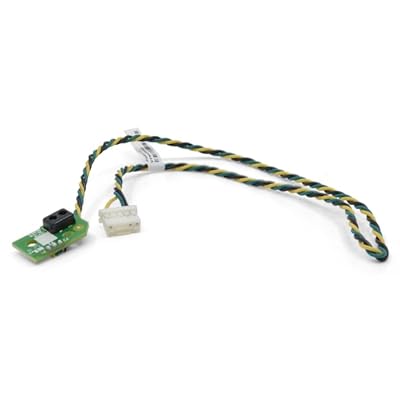
Ribbon Out Sensor for Zebra ZT510 Thermal Barcode Label Mobile Printer P1083347-015
Artigo n.º:
126561387
STD 2256950
Detalhes do Preço
Excluding Shipping & Custom charges ( Shipping and custom charges will be calculated on checkout )
*All items will import from EUA
0 ratings
Escrever uma avaliação
Em stock
 Importado da loja USA
Encomende já e receba por volta de Monday, Agosto 10
Transação segura
A Ubuy trabalha arduamente para proteger a sua segurança e privacidade. O nosso sistema avançado de segurança de pagamentos garante a confidencialidade ao encriptar as suas informações durante a transmissão, utilizando os protocolos AES (Normas de Encriptação Avançada) e SSL (Camada de Sockets Seguros). Os seus dados de pagamento estão 100% seguros, pois não partilhamos os seus dados de pagamento com vendedores terceiros.
Os nossos principais Parceiros Logísticos


Our sensors have been tested many times by humans and machines, and their performance is guaranteed.

Fast
Shipping

Devolução
gratuita*

Embalagem Segura

Produtos 100% Originais

Certificação PCI DSS

Certificação ISO 27001


Note: Step Down Voltage Transformer required for using electronics products of EUA store (110-120). Recommended power converters COMPRAR AGORA.


O que se Destaca
Precision Detection
The Ribbon Out Sensor ensures accurate detection of ribbon availability, preventing printing errors and enhancing workflow efficiency in environments that rely on consistent barcode label production.
Compatibility
Designed specifically for Zebra ZT510 printers, this sensor guarantees seamless integration and operability, reducing the need for additional adjustments or compatibility concerns during installation.
Durable Design
Constructed from high-quality materials, this Ribbon Out Sensor offers exceptional longevity and reliability, making it a cost-effective solution for businesses that prioritize long-term operational efficiency and minimal maintenance.
Detalhes do produto
| Connectivity Technology | USB Cable |
| Item Dimensions D x W x H | 1"D x 1"W x 1"H (2.5 x 2.5 x 2.5 cm) |
| Brand | Kaibintex |
| Manufacturer | Kaibintex |
| Built-In Media | sensor flex cable |
| Product Dimensions (L x W x H) | 1"D x 1"W x 1"H (2.5 x 2.5 x 2.5 cm) |
Quem Deverá Comprar?

-
Frequent Label Users
Ideal for users who regularly print labels, ensuring consistent quality and efficiency with the Zebra ZT510 printer.
-
Logistics Companies
Perfect for logistics firms needing accurate label printing for shipping and inventory management with minimal downtime.
-
Mobile Printing Needs
Suitable for businesses that require portable solutions, enhancing productivity with on-the-go labeling capabilities.

-
Occasional Label Printers
Not suitable for users who rarely print labels, as cost may not justify the purchase for infrequent use.
DESCRIÇÃO DO PRODUTO
Ribbon Out Sensor for Zebra ZT510 Thermal Barcode Label Mobile Printer P1083347-015
Tem alguma Dúvida? Converse connosco
Perguntas e Respostas dos Clientes
-
Pergunta:
What is a Ribbon Out Sensor and how does it work in the Zebra ZT510 printer?
Resposta: The Ribbon Out Sensor is a critical component of the Zebra ZT510 Thermal Barcode Label Mobile Printer that detects when the ribbon has been used up or is running low. It works by sensing the presence or absence of the thermal transfer ribbon, ensuring uninterrupted label printing. This feature is especially useful in high-volume environments where maintaining printing accuracy is crucial. For example, if the sensor detects that the ribbon is out, it can pause the print job, preventing wasted materials and time, allowing the user to replace the ribbon promptly. -
Pergunta:
How do I install the Ribbon Out Sensor in my Zebra ZT510 printer?
Resposta: Installing the Ribbon Out Sensor in your Zebra ZT510 printer is a straightforward process. First, ensure that the printer is turned off. Then, access the printer's internal compartment where the sensor is located. Carefully remove the old sensor and replace it with the new one, ensuring that it is properly seated. After installation, turn on the printer and run a test print to ensure that the sensor is functioning correctly. This process is ideal for users who frequently switch out parts to ensure optimal printer performance. -
Pergunta:
What can cause the Ribbon Out Sensor to malfunction?
Resposta: Malfunctions of the Ribbon Out Sensor in the Zebra ZT510 can be attributed to several factors. Common issues include dirt or debris obstructing the sensor, physical damage to the sensor, or poor electrical connections. Regular maintenance and cleaning of the printer, as well as checking for loose wires, can help prevent these issues. As an example, if labels are printing incorrectly or if the printer pauses unexpectedly, inspecting the sensor would be a practical first step in troubleshooting the problem. -
Pergunta:
Can I use third-party ribbons with my Zebra ZT510 printer while using the Ribbon Out Sensor?
Resposta: Yes, you can use third-party ribbons with the Zebra ZT510 printer while utilizing the Ribbon Out Sensor. However, it is important to ensure that the ribbons meet the specifications required for optimal performance. Using compatible ribbons helps prevent sensor malfunctions and ensures high-quality print results. For instance, if you frequently print shipping labels, ensure that the ribbons are suitable for the material and the print environment. -
Pergunta:
How do I troubleshoot if the Ribbon Out Sensor keeps triggering an error?
Resposta: If the Ribbon Out Sensor in your Zebra ZT510 continuously triggers an error, begin by checking for any obstructive debris around the sensor. Cleaning the area may resolve the issue. Next, inspect the ribbon for proper installation and ensure that it is the correct type. If problems persist, it might indicate a faulty sensor that requires replacement. This troubleshooting approach can save time and improve printing efficiency. -
Pergunta:
What types of applications are suitable for the Zebra ZT510 printer with the Ribbon Out Sensor?
Resposta: The Zebra ZT510 printer equipped with a Ribbon Out Sensor is suitable for a variety of applications including logistics, retail, and manufacturing. For instance, businesses that require on-demand label printing for shipping or inventory management will benefit from the reliability of the sensor preventing interruptions. This functionality is essential for maintaining workflow efficiency in busy environments. -
Pergunta:
Is the Ribbon Out Sensor specific to the Zebra ZT510 model?
Resposta: Yes, the Ribbon Out Sensor is tailored specifically for the Zebra ZT510 model to ensure optimal compatibility and performance. While other Zebra printers may have similar sensors, they may differ in design and installation procedures. Using the correct sensor for your printer prevents operational issues and ensures that your label printing runs smoothly, especially in high-volume situations. -
Pergunta:
How can I identify if my Ribbon Out Sensor needs replacement?
Resposta: You can identify if your Ribbon Out Sensor needs replacement by observing frequent error messages related to ribbon status or if the printer fails to detect the presence of a ribbon even when properly installed. Additionally, if you notice inconsistent print quality, it might indicate sensor failure. Regularly monitoring your printer's performance and addressing issues promptly can enhance productivity. -
Pergunta:
Where can I buy the Ribbon Out Sensor for Zebra ZT510 Thermal Barcode Label Mobile Printer P1083347-015 in São Tomé and Príncipe?
Resposta: You can purchase the Ribbon Out Sensor for the Zebra ZT510 Thermal Barcode Label Mobile Printer P1083347-015 at Ubuy in São Tomé and Príncipe. Ubuy offers a variety of printer parts, including essential components like the Ribbon Out Sensor, ensuring you receive quality products for your printing needs. -
Pergunta:
What maintenance tips can help prolong the life of my Zebra ZT510 printer's Ribbon Out Sensor?
Resposta: To prolong the life of the Ribbon Out Sensor in your Zebra ZT510 printer, regular cleaning is essential. Ensure that dirt and debris are cleared from the sensor area to prevent obstruction. Additionally, routinely checking for loose connections can help maintain functionality. Implementing a maintenance schedule not only enhances the sensor's performance but also optimizes the overall printer life, ensuring reliable label printing over time.
Kaibintex Label Makers Editorial Review
Nenhuma análise editorial encontrada
Avaliações e Classificações dos Clientes
1 classificações de clientes
-
5 Estrela
100%
-
4 Estrela
0%
-
3 Estrela
0%
-
2 Estrela
0%
-
1 Estrela
0%
Avaliar este produto
Partilhe as suas ideias com outros clientes
CONFIANÇA NA PLATAFORMA E SEGURANÇA DO COMPRADOR

MA
Mohammad
Comprador verificado
“Excellent quality and original too,when ubuy send original things I will appreciate that ,I very satisfied thank you”
23 July 2026 · via Trustpilot
CK
Chitra
Comprador verificado
“The order and delivery progress was communicated very well. Package arrived within the estimated time. Products arrived as expected in good condition.”
22-Jul-26 · via Trustpilot
K
kund
Comprador verificado
“Good supply of products. Safe payment methods, and shipment worldwide! Genuine products.”
23-Jul-26 · via Trustpilot
OO
Onesi
Comprador verificado
“Was my first time buying a product from Ubuy, but I found it so helpful. This is reliable. Gonna place a new order!”
22 July 2026 · via Trustpilot
SJ
SAO JOHN
Comprador verificado
“Ubuy is a great online platform to buy stuff. Reliable, fast delivery time and great value for money. I've been using Ubuy online shopping platform for three years now and will continue to do so.”
23 July 2026 · via Trustpilot
Checkout Seguro
Entrega Global
Devoluções Fáceis
Produtos Genuínos
Histórico de preços do produto
Informação importante
- Limitações: para produtos expedidos internacionalmente, tenha em atenção que qualquer garantia do fabricante pode não ser válida; opções de serviço do fabricante podem não estar disponíveis; manuais de produtos, instruções e avisos de segurança podem não estar nas línguas do país de destino; os produtos (e materiais que o acompanham) pode não ter sido concebido em conformidade com as normas, especificações e requisitos de rotulagem do país de destino; e os produtos podem não estar em conformidade com a voltagem e outras normas elétricas do país de destino (requerendo assim o uso de um adaptador ou conversor caso seja apropriado). O destinatário é responsável por garantir que o produto pode ser legalmente importado para o país de destino. Quando encomenda à Ubuy ou aos seus afiliados, o destinatário é o importador de registo e deve estar em conformidade com todas as leis e regulamentos do país de destino.
- Nem todos os produtos listados na Ubuy estão à venda, uma vez que a Ubuy é um motor de busca global. Os produtos estão sujeitos a leis de exportação/comércio.
STD 2256950
Encomende já e receba por volta de Monday, Agosto 10
Este artigo não está restrito no meu país. (Clique no link acima se este artigo não estiver restrito no seu país, para que a nossa equipa o analise e permita.)
Qtd.:
Transação segura
Em conformidade com a norma PCI DSS e com certificação ISO 27001:2022, com pagamentos encriptados e proteção total do comprador em todas as encomendas.
Os nossos principais Parceiros Logísticos
Entrega internacional mais rápida
Recursos e benefícios
- Highly compatible and flexible ribbon out sensor for Zebra ZT510 printer.
- Exquisitely designed packaging ensures safe delivery.
- Extensively tested for reliability by experts and machines.
- Guaranteed stable and reliable print output quality.
- Improved design enhances printing effects and quality.
- Essential for optimal printer performance.
Ubuy Assurance
Experience worry-free shopping with 100% original products, PCI DSS-compliant payment security, ISO 27001-certified data protection, the fastest cross-border delivery, free returns *, and secure packaging on every order.