- Pagina inicial /
- Eletrónica /
- Computers, Laptops and Tablets /
- Computer Accessories /
- Computer Keyboards & Mice /
- Computer Keyboards /
- Wireless Keyboards /
- Logitech MX Creative Console Keypad & Dial Ke...
0 ratings


Artigo n.º:
90536810
Logitech MX Creative Console Keypad & Dial Keyboard 920-012660
Artigo n.º:
90536810
STD 5936443
Price Details
Excluding Shipping & Custom charges ( Shipping and custom charges will be calculated on checkout )
*All items will import from EUA
0 ratings
Escreva um comentário
Em estoque
 Importado da loja USA
Encomende já e receba por volta de Terça-feira, Junho 30
Transação segura
A Ubuy trabalha arduamente para proteger a sua segurança e privacidade. O nosso sistema avançado de segurança de pagamentos garante a confidencialidade ao encriptar as suas informações durante a transmissão, utilizando os protocolos AES (Normas de Encriptação Avançada) e SSL (Camada de Sockets Seguros). Os seus dados de pagamento estão 100% seguros, pois não partilhamos os seus dados de pagamento com vendedores terceiros.
Os nossos principais Parceiros Logísticos


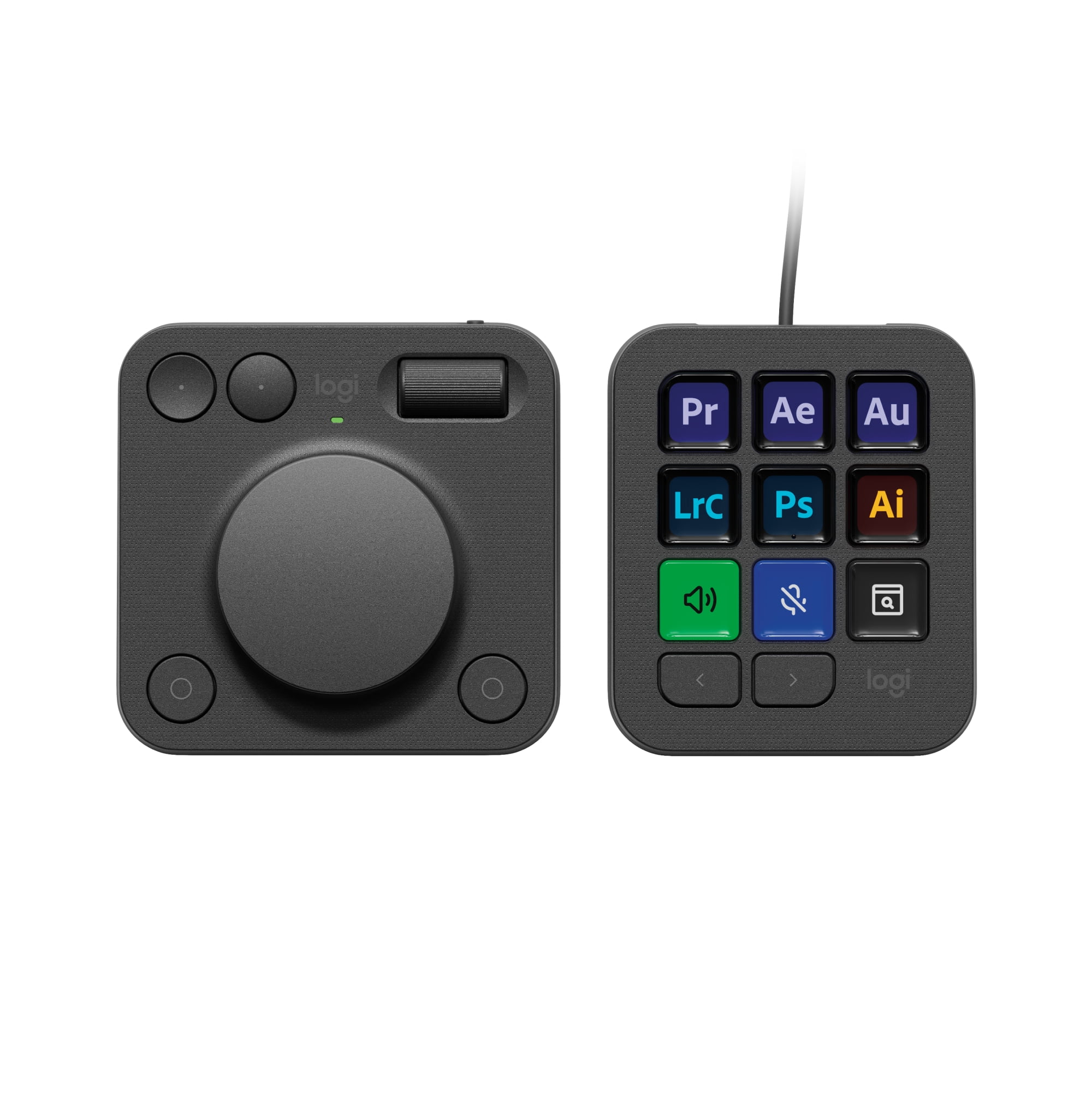
Unlock your creative potential with the Logitech MX Creative Console, designed specifically for graphic design, video editing, and photography.

Fast
Shipping

Devolução
gratuita*

Embalagem Segura

Produtos 100% Originais

Certificação PCI DSS

Certificação ISO 27001


Note: Step Down Voltage Transformer required for using electronics products of EUA store (110-120). Recommended power converters Compre Agora.


O que se Destaca
Customizable LCD Keys
Empower your creativity with nine programmable LCD keys, offering instant access to frequently used tools, enhancing workflow efficiency in graphic design and video editing.
Versatile Control Dial
Smoothly adjust settings with the intuitive control dial, ideal for precise control in photography, sound editing, and more, ensuring a professional touch to your projects.
Multimedia Compatibility
Seamlessly integrate with applications like Adobe, Zoom, and Spotify, allowing you to streamline your work across multiple platforms while enjoying maximum versatility.
Detalhes do produto
| Features | Customizable Keys, Backlit Keys |
| Wireless | Y |
| Computer keyboard type | Multimedia Keyboards |
| Brand | Logitech |
| Color | Graphite |
| Power type | Corded Electric |
| Connection | USB-C |
| Number of keys | 9 |
| Keyboard layout | Qwerty |
| Battery consumption type | Changeable Disposable Battery |
| Battery size | AAA |
| Cable length | 4.92 ft |
| Accessories | 2 x AAA Batteries, USB C to C High-speed 2.0 Cable, Stand, User Documentation |
| Height | 2.7 in (6.9 cm) |
| Weight | 1.25 lb (570 grams) |
| Model name | MX Creative Console |
| Theme | Gaming |
| Count per pack | 1 |
| Retail packaging | Single Piece |
| Has written warranty | No |
Quem Deverá Comprar?

-
Creative Professionals
Ideal for graphic designers and video editors who need custom shortcuts for software like Adobe or Final Cut Pro.
-
Content Creators
Perfect for streamers and vloggers using Zoom and other platforms, allowing easy access to controls and functions.
-
Music Enthusiasts
Great for those who use Spotify frequently, enabling quick playback controls and track management at their fingertips.

-
Casual Users
Not suitable for general users who do not require advanced programmable features and prefer a standard keyboard.
-
Budget-Conscious Shoppers
May be too expensive for individuals looking for basic functionality without the need for customizable keys.
-
Mobile Users
Inconvenient for users who work primarily on laptops and require a more portable and compact solution.
DESCRIÇÃO DO PRODUTO
Logitech MX Creative Console Keypad & Dial Keyboard 920-012660
Tem alguma Dúvida? Converse connosco
Perguntas e Respostas dos Clientes
-
pergunta:
Is the Logitech MX Creative Console compatible with both Windows and Mac?
Resposta: Yes, it is compatible with both PC and Mac systems. -
pergunta:
How many customizable keys does the console have?
Resposta: It features 9 customizable LCD keys for personalized functionality. -
pergunta:
What types of software can I use with this keypad?
Resposta: You can use it with software like Adobe Creative Suite, Zoom, and Spotify.
Logitech Wireless Keyboards Editorial Review
The Logitech MX Creative Console has garnered a mostly positive reception among users, particularly among professionals in creative fields such as graphic design, video editing, and photography. Users appreciate the device’s robust functionality, particularly its customizability and seamless integration with popular software applications like Adobe Creative Suite and OBS. This programmability is particularly touted for streamlining workflows by allowing easy access to multiple functions across different profiles, with many noting that the MX Creative Console effectively acts like a supercharged keyboard. Despite a bit of a learning curve when transitioning from other devices such as the Loupedeck, users have reported that the time savings from using the MX Creative Console for repetitive tasks and macro assignments is significant. The 15 programmable pages per profile provide ample flexibility to set up shortcuts for various operations, enhancing productivity during creative sessions. However, the device is not without its drawbacks. A notable concern is the delay experienced with the volume dial, which can hinder quick adjustments. This delay, while intended to Conserve battery life in the Bluetooth-enabled dialpad, has frustrated some users who desire real-time responsiveness. Moreover, the context-switching feature, while useful, has brought challenges when multiple applications compete for focus, disrupting fluidity during presentations or live sessions. In terms of programming ease, some users feel the Console's software falls short compared to other similar devices, like the Elgato Stream Deck. Initial setup can also be less than intuitive for those unfamiliar with the intricacies of the software, and the reliance on battery power for the dial pad raises concern about potential power management issues. The USB-C connection is viewed as limiting, particularly for users without multiple ports for connectivity. Overall, the Logitech MX Creative Console is highly recommended for professionals looking to enhance their workflow with customizable controls, though it may require a little patience and adjustment to fully leverage its capabilities. **
Avaliações e Classificações dos Clientes
1 classificações de clientes
-
5 Estrela
100%
-
4 Estrela
0%
-
3 Estrela
0%
-
2 Estrela
0%
-
1 Estrela
0%
Avaliar este produto
Partilhe as suas ideias com outros clientes
Prós
- Highly customizable with extensive integration options for creative software.
- Streamlines workflow, especially for repetitive tasks.
- Large number of programmable buttons and profiles enhances productivity.
Contras
- Initial learning curve and setup can be challenging.
Histórico de preços do produto
Informação importante
- Limitações: para produtos expedidos internacionalmente, tenha em atenção que qualquer garantia do fabricante pode não ser válida; opções de serviço do fabricante podem não estar disponíveis; manuais de produtos, instruções e avisos de segurança podem não estar nas línguas do país de destino; os produtos (e materiais que o acompanham) pode não ter sido concebido em conformidade com as normas, especificações e requisitos de rotulagem do país de destino; e os produtos podem não estar em conformidade com a voltagem e outras normas elétricas do país de destino (requerendo assim o uso de um adaptador ou conversor caso seja apropriado). O destinatário é responsável por garantir que o produto pode ser legalmente importado para o país de destino. Quando encomenda à Ubuy ou aos seus afiliados, o destinatário é o importador de registo e deve estar em conformidade com todas as leis e regulamentos do país de destino.
- Nem todos os produtos listados na Ubuy estão à venda, uma vez que a Ubuy é um motor de busca global. Os produtos estão sujeitos a leis de exportação/comércio.
STD 5936443
Encomende já e receba por volta de Terça-feira, Junho 30
Este artigo não está restrito no meu país. (Clique no link acima se este artigo não estiver restrito no seu país, para que a nossa equipa o analise e permita.)
QTY:
Transação segura
A Ubuy trabalha arduamente para proteger a sua segurança e privacidade. O nosso sistema avançado de segurança de pagamentos garante a confidencialidade ao encriptar as suas informações durante a transmissão, utilizando os protocolos AES (Normas de Encriptação Avançada) e SSL (Camada de Sockets Seguros). Os seus dados de pagamento estão 100% seguros, pois não partilhamos os seus dados de pagamento com vendedores terceiros.
Os nossos principais Parceiros Logísticos
Entrega internacional mais rápida
Recursos e benefícios
- 9 customizable LCD keys for maximum versatility.
- Control dial enhances editing efficiency and precision.
- Seamless integration with Adobe, Zoom, Spotify, and more.
- Wireless Bluetooth connectivity for hassle-free use.
- Compatible with both PC and Mac systems.
- USB Type C cable included for easy charging.