- Pagina inicial /
- Produtos de Escritório /
- Eletrónica de escritório /
- Scanner & Accessories /
- Computer Scanner /
- Document Scanner /
- Epson Workforce ES-400 II Color Duplex Deskto...
0 ratings


Artigo n.º:
123783749
Epson Workforce ES-400 II Color Duplex Desktop Document Scanner for PC and Mac, with Auto Document Feeder (ADF) and Image Adjustment Tools & Black
Artigo n.º:
123783749
STD 10286990
Price Details
Excluding Shipping & Custom charges ( Shipping and custom charges will be calculated on checkout )
*All items will import from EUA
6%
0 ratings
Escreva um comentário
Em estoque
 Importado da loja USA
Transação segura
A Ubuy trabalha arduamente para proteger a sua segurança e privacidade. O nosso sistema avançado de segurança de pagamentos garante a confidencialidade ao encriptar as suas informações durante a transmissão, utilizando os protocolos AES (Normas de Encriptação Avançada) e SSL (Camada de Sockets Seguros). Os seus dados de pagamento estão 100% seguros, pois não partilhamos os seus dados de pagamento com vendedores terceiros.
Os nossos principais Parceiros Logísticos


Get organized fast with the WorkForce ES-400 II duplex desktop document scanner, capturing both sides of each sheet in one pass at speeds up to 35 ppm/70 ipm.
Este conjunto contém 2 items


Fast
Shipping

Devolução
gratuita*

Embalagem Segura

Produtos 100% Originais

Certificação PCI DSS

Certificação ISO 27001


Note: Step Down Voltage Transformer required for using electronics products of EUA store (110-120). Recommended power converters Compre Agora.


O que se Destaca
Duplex Scanning
Efficiently scans both sides of documents in one pass, saving time and enhancing productivity for busy professionals needing quick digitalization.
Auto Document Feeder
Holds up to 50 pages, allowing for uninterrupted scanning of multi-page documents, perfect for offices with high document turnover.
Image Adjustment Tools
Offers advanced tools for enhancing scan quality, ensuring clear and professional images that meet various business needs, elevating document presentation.
Detalhes do produto
- Product 1: Get organized in a snap — scan up to 35 ppm/70 ipm (1); Single-Step Technology captures both sides in one pass
- Product 1: Quickly scan stacks of paper — robust 50-sheet Auto Document Feeder easily accommodates multiple paper types and sizes in one batch
- Product 1: Powerful software included — easy scanning with intuitive Epson ScanSmart Software (2); preview, email, upload to the cloud and more; automatic file naming saves time
- Product 1: Seamless integration with most software solutions — the included TWAIN driver allows you to easily incorporate your data into most document management software
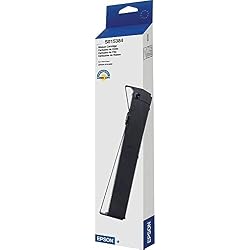
- Product 2: Designed and engineered to meet the demands of Epson's fast, high performance impact printers
- Product 2: Long-lasting and easy to install, Epson ribbons provide longer life and better character definition than imitation supplies
- Product 2: Epson supplies guarantee Epson quality
| Scanner Type | Document |
| Connection Type | USB, Wi-Fi |
| Resolution | 300 |
| Color Depth | 24 bits_per_pixel |
| Standard Sheet Capacity | 50 |
| Optical Sensor Technology | CCD |
| Media Type | Paper |
| Brand | Epson |
| Model Name | B11B261201 |
| Minimum System Requirements | Windows 7 |
| Connectivity Technology | USB, Wi-Fi |
| Maximum Media Size | 11 x 17 inches (27.9 cm) |
| Item Weight | 11 lbs (4.99 kg) |
Quem Deverá Comprar?

-
Small Businesses
Ideal for small businesses that require efficient, high-speed scanning to manage important documents digitally.
-
Home Offices
Perfect for home office users needing reliable, compact scanning solutions that can handle both color and black-and-white documents.
-
Students
Beneficial for students who need to digitize notes and research materials quickly and accurately for easy reference.

-
Heavy Users
Not suitable for users needing extensive daily scanning as long-term durability may be a concern.
DESCRIÇÃO DO PRODUTO
Tem alguma Dúvida? Converse connosco
Perguntas e Respostas dos Clientes
-
pergunta:
What are the key features of the Epson Workforce ES-400 II scanner?
Resposta: The Epson Workforce ES-400 II scanner boasts numerous key features including color duplex scanning, an Auto Document Feeder (ADF) that accommodates up to 50 pages, and advanced image adjustment tools. These features enable users to efficiently scan double-sided documents and images at impressive speeds. Whether you're digitizing contracts, receipts, or multi-page reports, the ES-400 II provides excellent clarity and color accuracy, making it ideal for both home and office settings. Its compact design allows for easy placement on desks without taking up much space. -
pergunta:
How does the Auto Document Feeder (ADF) work on the ES-400 II?
Resposta: The ADF on the Epson Workforce ES-400 II allows for quick and efficient scanning of multiple pages in one go. It can hold and process up to 50 sheets automatically, making it perfect for busy professionals who handle large volumes of paperwork. The ADF is particularly beneficial for digitizing multi-page documents, freeing users from the hassle of scanning each page individually. This saves time and ensures that all pages are scanned in one streamlined process, enhancing productivity in both office and home environments. -
pergunta:
Can the Epson ES-400 II scan documents in different sizes?
Resposta: Yes, the Epson Workforce ES-400 II scanner can handle various document sizes, from receipts and business cards to legal-sized documents. This versatility makes it suitable for different scanning needs, allowing users to digitize a wide array of materials without needing multiple devices. Users can adapt the scanner's settings according to the size of the documents being scanned, ensuring precise and high-quality results every time, thereby catering to diverse office tasks and personal projects alike. -
pergunta:
Is the Epson Workforce ES-400 II compatible with both PC and Mac?
Resposta: Absolutely, the Epson Workforce ES-400 II is designed to be compatible with both PC and Mac systems. This cross-platform functionality allows users from various operating environments to leverage its scanning capabilities without worrying about connectivity issues. Setting up the scanner is straightforward, making it an excellent choice for mixed-device offices or users who switch between PC and Mac. Compatibility ensures that a broader scope of users can access the powerful features of the ES-400 II effectively. -
pergunta:
What connectivity options does the ES-400 II offer?
Resposta: The Epson Workforce ES-400 II scanner features versatile connectivity options, including USB 3.0 for high-speed connections to computers. This ensures fast data transfer and efficient scanning operations. Additionally, it supports wireless connectivity, allowing users to scan directly to cloud services or email, which enhances workflow flexibility. This dual connectivity makes the ES-400 II a practical choice for modern work environments where mobile and remote working is increasingly common. -
pergunta:
What types of image adjustment tools does the ES-400 II include?
Resposta: The Epson Workforce ES-400 II comes equipped with advanced image adjustment tools that include features like automatic color detection, image cropping, and enhancement options. These tools allow users to optimize scanned images for better clarity and presentation. For instance, users can adjust brightness and contrast to improve readability, particularly for older documents that may have faded over time. This capability is crucial for creating professional-quality digital archives or presentations. -
pergunta:
How fast can the Epson ES-400 II scan documents?
Resposta: The Epson Workforce ES-400 II scanner is capable of scanning up to 35 pages per minute for single-sided documents and 70 images per minute for double-sided pages in duplex mode. This high-speed performance makes it one of the fastest scanners in its class, ideal for busy environments where time efficiency is critical. Users in offices processing numerous documents daily will find that this speed significantly increases productivity and streamlines their workflow. -
pergunta:
Can I use the ES-400 II for scanning photos?
Resposta: Yes, the Epson Workforce ES-400 II is suitable for scanning photos alongside regular documents. Its high-resolution scanning ensures images are captured with precision and vivid color accuracy, making it a great option for digitizing family albums or artwork. Users should consider the image adjustment tools to enhance photo quality further, ensuring that scanned images retain their original detail and color richness when archived or shared. -
pergunta:
Is there a recommended software to use with the ES-400 II?
Resposta: Epson provides its own software solutions that complement the Workforce ES-400 II, such as Epson Document Capture, which allows users to manage scanned files efficiently and integrate them with cloud services. Additionally, third-party applications like Adobe Acrobat and Microsoft Office are also compatible, providing options for users to edit, store, and share their scanned files. Choosing software that matches your workflow will help you maximize the scanner’s capabilities while ensuring seamless document management. -
pergunta:
Where can I buy the Epson Workforce ES-400 II scanner in São Tomé and Príncipe?
Resposta: You can purchase the Epson Workforce ES-400 II Color Duplex Desktop Document Scanner for PC and Mac, with Auto Document Feeder (ADF) and Image Adjustment Tools from Ubuy in São Tomé and Príncipe. Ubuy offers a convenient online shopping experience, with options to explore different features and specifications, ensuring you find the right model that fits your needs. Shopping with Ubuy allows for a seamless transaction, making it an ideal choice for acquiring this advanced scanner.
Epson Document Scanners Editorial Review
Nenhuma revisão editorial encontrada
Avaliações e Classificações dos Clientes
1 classificações de clientes
-
5 Estrela
0%
-
4 Estrela
100%
-
3 Estrela
0%
-
2 Estrela
0%
-
1 Estrela
0%
Avaliar este produto
Partilhe as suas ideias com outros clientes
Platform Trust & Buyer Confidence

MT
Mohd
Verified buyer
“The product received very good packaging & safe…Thank You”
16 June 2026 · via Trustpilot
SJ
Shawati
Verified buyer
“Accurate delivery timing given”
16 June 2026 · via Trustpilot
YB
Youcef
Verified buyer
“Not madly expensive like I thought, and much quicker than promised.”
15 June 2026 · via Trustpilot
LM
Leila
Verified buyer
“Never dealt with Ubuy before, but everything worked out great. Seamless cross border purchasing and shipping. Thanks!”
6/7/2026 · via Trustpilot
KA
Kwame
Verified buyer
“The process was smooth, with clear communication and timelines. This was my 1st purchase and I am really impressed. I will definitely be coming back.”
12 June 2026 · via Trustpilot
Checkout Seguro
Global Delivery
Devoluções Fáceis
Genuine Products
Histórico de preços do produto
Informação importante
- Limitações: para produtos expedidos internacionalmente, tenha em atenção que qualquer garantia do fabricante pode não ser válida; opções de serviço do fabricante podem não estar disponíveis; manuais de produtos, instruções e avisos de segurança podem não estar nas línguas do país de destino; os produtos (e materiais que o acompanham) pode não ter sido concebido em conformidade com as normas, especificações e requisitos de rotulagem do país de destino; e os produtos podem não estar em conformidade com a voltagem e outras normas elétricas do país de destino (requerendo assim o uso de um adaptador ou conversor caso seja apropriado). O destinatário é responsável por garantir que o produto pode ser legalmente importado para o país de destino. Quando encomenda à Ubuy ou aos seus afiliados, o destinatário é o importador de registo e deve estar em conformidade com todas as leis e regulamentos do país de destino.
- Nem todos os produtos listados na Ubuy estão à venda, uma vez que a Ubuy é um motor de busca global. Os produtos estão sujeitos a leis de exportação/comércio.
STD 10286990
Encomende já e receba por volta de Monday, Julho 27
Este artigo não está restrito no meu país. (Clique no link acima se este artigo não estiver restrito no seu país, para que a nossa equipa o analise e permita.)
QTY:
Transação segura
PCI DSS compliant and ISO 27001:2022 certified, with encrypted payments and full buyer protection on every order.
Os nossos principais Parceiros Logísticos
Entrega internacional mais rápida
Recursos e benefícios
- Fast scanning up to 35 ppm/70 ipm for efficient organization.
- Duplex technology captures both sides of documents in one pass.
- 50-sheet Auto Document Feeder accommodates various paper types and sizes.
- User-friendly Epson ScanSmart Software enhances scanning experience.
- Compatible with most document management software via TWAIN driver.
- Offers features like auto crop and dirt detection for better image quality.
Ubuy Assurance
Experience worry-free shopping with 100% original products, PCI DSS-compliant payment security, ISO 27001-certified data protection, the fastest cross-border delivery, free returns *, and secure packaging on every order.