0 ratings

Artigo n.º:
43698670
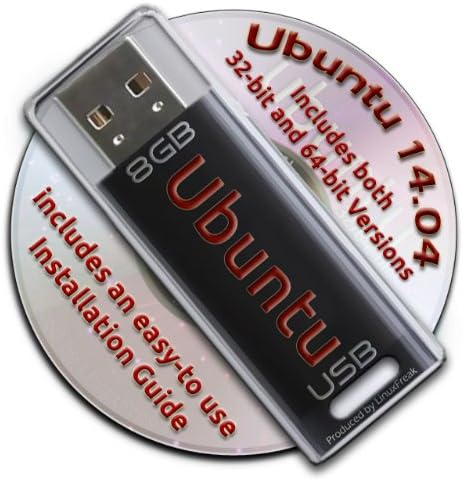
Ubuntu Linux 14.04 Bootable 8GB USB Flash Drive - Contains Both 32-bit and 64-bit.
Artigo n.º:
43698670
STD 897870
Price Details
Excluding Shipping & Custom charges ( Shipping and custom charges will be calculated on checkout )
*All items will import from EUA
0 ratings
Escreva um comentário
Em estoque
 Importado da loja USA
QTY:
Encomende já e receba por volta de Quarta-feira, Julho 29
Transação segura
A Ubuy trabalha arduamente para proteger a sua segurança e privacidade. O nosso sistema avançado de segurança de pagamentos garante a confidencialidade ao encriptar as suas informações durante a transmissão, utilizando os protocolos AES (Normas de Encriptação Avançada) e SSL (Camada de Sockets Seguros). Os seus dados de pagamento estão 100% seguros, pois não partilhamos os seus dados de pagamento com vendedores terceiros.
Os nossos principais Parceiros Logísticos


Now you can take your Ubuntu installation with you anywhere, and always have your own O/S on any PC you use!

Fast
Shipping

Devolução
gratuita*

Embalagem Segura

Produtos 100% Originais

Certificação PCI DSS

Certificação ISO 27001


Note: Step Down Voltage Transformer required for using electronics products of EUA store (110-120). Recommended power converters Compre Agora.


O que se Destaca
Dual Architecture
Includes both 32-bit and 64-bit versions, ensuring compatibility with a wide range of hardware setups, making it a versatile choice for all users.
Bootable Ready
Preloaded with Ubuntu 14.04, the USB drive is ready to boot immediately, offering a hassle-free setup to users wanting to experiment or install Linux.
Portable Convenience
The compact 8GB size makes it easy to carry, allowing users to have Ubuntu on-the-go, ideal for troubleshooting or secure computing on any compatible machine.
Detalhes do produto
| Item Weight | 0.2 lbs (90 grams) |
Quem Deverá Comprar?

-
Linux Beginners
Ideal for users new to Linux wanting an easy installation process without needing additional technical skills.
-
Portable OS Users
Great for those needing a lightweight operating system that can be run from USB on multiple computers.
-
System Recovery
Useful for users wanting to troubleshoot or recover data from a non-booting computer using a live USB.

-
Windows Users
Not suitable for users who primarily use Windows and have no interest in transitioning to a Linux environment.
DESCRIÇÃO DO PRODUTO
Ubuntu Linux 14.04 Bootable 8GB USB Flash Drive - Contains Both 32-bit and 64-bit.
Tem alguma Dúvida? Converse connosco
Perguntas e Respostas dos Clientes
-
pergunta:
What is included on the Ubuntu Linux 14.04 Bootable USB Flash Drive?
Resposta: The Ubuntu Linux 14.04 Bootable USB Flash Drive comes pre-loaded with both the 32-bit and 64-bit versions of the Ubuntu operating system. This gives users the flexibility to choose the version that best fits their hardware capabilities. Additionally, the USB drive is formatted to be bootable, allowing for straightforward installation on compatible devices without the need for additional setup. Whether you're revamping an older computer or setting up a new system, this USB drive is a practical solution. -
pergunta:
How do I create a bootable USB drive with Ubuntu Linux 14.04?
Resposta: Creating a bootable USB drive with Ubuntu Linux 14.04 is a straightforward process. Simply plug the USB drive into your computer, and during the boot-up sequence, access the BIOS or boot menu. From there, you’ll select the USB drive as the boot device. The USB contains installation files that will lead you through the setup process. This method is efficient for installing Ubuntu on various machines quickly, so it's especially useful for system administrators or users managing multiple installations. -
pergunta:
Is Ubuntu Linux 14.04 suitable for older hardware?
Resposta: Yes, Ubuntu Linux 14.04 is particularly suitable for older hardware. Its lightweight design allows it to run smoothly on systems with lower specifications, making it an excellent choice for revitalizing older computers. Unlike some modern operating systems that require more resources, Ubuntu 14.04 can comfortably operate on machines with limited RAM and processing power, thereby extending the useful life of older devices. -
pergunta:
What are the key features of Ubuntu Linux 14.04?
Resposta: Ubuntu Linux 14.04 offers a rich set of features, including a user-friendly interface, improved performance, and robust security enhancements. The long-term support (LTS) status of this version means that it receives essential updates and support for an extended period. Features like the Unity desktop environment, compatibility with a wide range of hardware, and a vast repository of software applications greatly enhance user experience. This makes it ideal for both personal and professional use. -
pergunta:
Can I use this USB drive for persistent storage?
Resposta: Yes, you can utilize the Ubuntu Linux 14.04 Bootable USB Flash Drive for persistent storage, allowing you to save files and settings between sessions. Persistent storage enables you to keep installed applications and personal files, making the USB drive a flexible, portable solution for running Ubuntu. This is especially handy for individuals who need a reliable operating system on the go, whether for work or study. -
pergunta:
What should I do if I encounter issues booting from the USB drive?
Resposta: If you experience issues booting from the USB drive, first ensure that your computer is set to boot from USB in the BIOS settings. Double-check the connection and try using a different USB port if necessary. If the problem persists, the USB may need to be reformatted as a bootable drive again. Refer to the installation instructions that come with the USB or visit official Ubuntu documentation for troubleshooting tips to resolve common boot-related challenges. -
pergunta:
Is Ubuntu Linux 14.04 safe to use?
Resposta: Yes, Ubuntu Linux 14.04 is considered safe to use. The operating system is built with security in mind, featuring a robust permissions system and firewall. Regular security updates from the Ubuntu community help to protect users from vulnerabilities. Additionally, being open-source allows its code to be scrutinized by developers around the world, contributing to a more secure environment. This makes it a reliable choice for users who prioritize security in their computing activities. -
pergunta:
Can I run this Ubuntu version on a virtual machine?
Resposta: Absolutely! You can run Ubuntu Linux 14.04 on a virtual machine by using virtualization software such as VirtualBox or VMware. Simply create a new virtual machine, allocate resources such as RAM and disk space, and choose the USB drive as the boot medium. This is particularly useful for developers or testers who need to experiment with different operating systems without altering their main system. -
pergunta:
What are the system requirements for Ubuntu Linux 14.04?
Resposta: The system requirements for Ubuntu Linux 14.04 are quite modest, which is one reason for its popularity among users with older hardware. You need at least a 1 GHz processor, 1 GB of RAM, and around 5 GB of free disk space. However, for optimal performance, especially with the graphical interface, it is recommended to have 2 GB of RAM. This makes it accessible for a wide range of computers, from older desktops to newer laptops. -
pergunta:
Where can I buy Ubuntu Linux 14.04 Bootable 8GB USB Flash Drive?
Resposta: You can buy the Ubuntu Linux 14.04 Bootable 8GB USB Flash Drive from Ubuy in São Tomé and Príncipe. Ubuy provides a convenient platform for ordering tech products, ensuring that you receive a reliable and usable bootable drive directly to your location. This makes it easier for customers looking to upgrade their systems or try out Ubuntu for the first time.
LinuxFreak USB Flash Drives Editorial Review
Nenhuma revisão editorial encontrada
Avaliações e Classificações dos Clientes
1 classificações de clientes
-
5 Estrela
100%
-
4 Estrela
0%
-
3 Estrela
0%
-
2 Estrela
0%
-
1 Estrela
0%
Avaliar este produto
Partilhe as suas ideias com outros clientes
Platform Trust & Buyer Confidence

MT
Mohd
Verified buyer
“The product received very good packaging & safe…Thank You”
16 June 2026 · via Trustpilot
SJ
Shawati
Verified buyer
“Accurate delivery timing given”
16 June 2026 · via Trustpilot
YB
Youcef
Verified buyer
“Not madly expensive like I thought, and much quicker than promised.”
15 June 2026 · via Trustpilot
LM
Leila
Verified buyer
“Never dealt with Ubuy before, but everything worked out great. Seamless cross border purchasing and shipping. Thanks!”
6/7/2026 · via Trustpilot
KA
Kwame
Verified buyer
“The process was smooth, with clear communication and timelines. This was my 1st purchase and I am really impressed. I will definitely be coming back.”
12 June 2026 · via Trustpilot
Checkout Seguro
Global Delivery
Devoluções Fáceis
Genuine Products
Histórico de preços do produto
Informação importante
- Limitações: para produtos expedidos internacionalmente, tenha em atenção que qualquer garantia do fabricante pode não ser válida; opções de serviço do fabricante podem não estar disponíveis; manuais de produtos, instruções e avisos de segurança podem não estar nas línguas do país de destino; os produtos (e materiais que o acompanham) pode não ter sido concebido em conformidade com as normas, especificações e requisitos de rotulagem do país de destino; e os produtos podem não estar em conformidade com a voltagem e outras normas elétricas do país de destino (requerendo assim o uso de um adaptador ou conversor caso seja apropriado). O destinatário é responsável por garantir que o produto pode ser legalmente importado para o país de destino. Quando encomenda à Ubuy ou aos seus afiliados, o destinatário é o importador de registo e deve estar em conformidade com todas as leis e regulamentos do país de destino.
- Nem todos os produtos listados na Ubuy estão à venda, uma vez que a Ubuy é um motor de busca global. Os produtos estão sujeitos a leis de exportação/comércio.
STD 897870
Encomende já e receba por volta de Quarta-feira, Julho 29
Este artigo não está restrito no meu país. (Clique no link acima se este artigo não estiver restrito no seu país, para que a nossa equipa o analise e permita.)
QTY:
Transação segura
PCI DSS compliant and ISO 27001:2022 certified, with encrypted payments and full buyer protection on every order.
Os nossos principais Parceiros Logísticos
Entrega internacional mais rápida
Recursos e benefícios
- Preinstalled USB stick for easy booting of Ubuntu Linux.
- Includes both 32-bit and 64-bit versions.
- Award-winning Linux OS with a complete set of applications.
- Lifetime free updates and multi-language support included.
- Comes with a productivity suite, web browser, and multimedia tools.
- Easy-to-follow installation guide included with pictures.
Ubuy Assurance
Experience worry-free shopping with 100% original products, PCI DSS-compliant payment security, ISO 27001-certified data protection, the fastest cross-border delivery, free returns *, and secure packaging on every order.