



- Pagina inicial /
- Eletrónica /
- Computer Accessories /
- Computer Components /
- Single Board Computers /
- waveshare 11.9inch Capacitive Touch Display C...
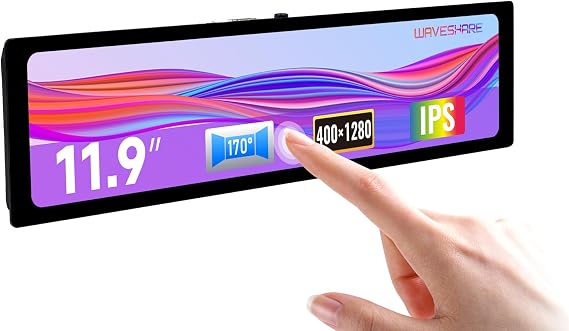
waveshare 11.9inch Capacitive Touch Display Compatible with Raspberry Pi 5/4B/3B/Zero/Zero W/Zero 2W/Pico/Pico W/Pico WH, 3201480 Resolution IPS DSI
STD 4776562
Price Details
Excluding Shipping & Custom charges ( Shipping and custom charges will be calculated on checkout )
*All items will import from EUA
QTY:
A Ubuy trabalha arduamente para proteger a sua segurança e privacidade. O nosso sistema avançado de segurança de pagamentos garante a confidencialidade ao encriptar as suas informações durante a transmissão, utilizando os protocolos AES (Normas de Encriptação Avançada) e SSL (Camada de Sockets Seguros). Os seus dados de pagamento estão 100% seguros, pois não partilhamos os seus dados de pagamento com vendedores terceiros.
11.9inch IPS display with capacitive touch panel, hardware resolution is 320x1480.
Fast
Shipping
Devolução
gratuita*
Embalagem Segura
Produtos 100% Originais
Certificação PCI DSS
Certificação ISO 27001
O que se Destaca
Detalhes do produto
| Peso do Item | 2.2 lbs (1 kg) |
Quem Deverá Comprar?
-
Embedded Projects
Ideal for developers creating interactive devices or kiosks using Raspberry Pi for user-friendly interfaces.
-
DIY Raspberry Pi
Perfect for hobbyists looking to build custom displays for Raspberry Pi projects, ensuring smooth touch interaction.
-
Fins educativos
Great for classrooms or workshops where students learn programming and design with Raspberry Pi hardware.
-
High-Resolution Needs
Not suitable for users requiring higher resolutions or demanding graphical applications beyond its 320x1480 specification.
-
Uso profissional
May not meet quality standards required for professional-grade applications in design or industrial environments.
-
Usuários Casuais
Less ideal for casual users who do not need advanced features and should consider simpler display solutions.
DESCRIÇÃO DO PRODUTO
waveshare 11.9inch Capacitive Touch Display Compatible with Raspberry Pi 5/4B/3B/Zero/Zero W/Zero 2W/Pico/Pico W/Pico WH, 3201480 Resolution IPS DSI Interface
Perguntas e Respostas dos Clientes
-
pergunta:
What devices are compatible with the Waveshare 11.9inch Capacitive Touch Display?
Resposta: The Waveshare 11.9inch Capacitive Touch Display is compatible with a wide range of Raspberry Pi models, including Raspberry Pi 5, 4B, 3B, Zero, Zero W, Zero 2W, Pico, Pico W, and Pico WH. This compatibility allows users to enhance their projects with a high-resolution display, making it suitable for various applications such as home automation, interactive media displays, or DIY electronics projects. The IPS technology ensures vibrant colors and wide viewing angles, improving user experience significantly. -
pergunta:
What is the resolution of the Waveshare 11.9inch Capacitive Touch Display?
Resposta: This display features an impressive resolution of 320 x 1480 pixels. This high pixel density ensures that images and text are sharp and clear, making it perfect for applications where detail is crucial. Whether you are developing a user interface for your Raspberry Pi project or using it for digital signage, the enhanced resolution elevates the visual quality, providing an engaging experience for users or viewers. -
pergunta:
Is the touch functionality on the display responsive?
Resposta: Yes, the capacitive touch functionality of the Waveshare 11.9inch display is highly responsive. Capacitive touchscreens are known for their precision and sensitivity compared to resistive screens. Users can enjoy smooth interactions, making it ideal for applications that require user input, such as gaming, programming, or interactive learning projects. This allows for a more engaging experience, especially in applications requiring real-time interactions. -
pergunta:
Can I use the display for a digital signage solution?
Resposta: Absolutely! The Waveshare 11.9inch Capacitive Touch Display is excellent for digital signage solutions due to its high resolution and capacitive touch capabilities. You can use it to showcase promotional content, interactive menus, or information displays in retail environments. The vibrant IPS display ensures that your content stands out and attracts attention, making it a perfect choice for businesses looking to enhance their visibility. -
pergunta:
How do I connect the Waveshare display to my Raspberry Pi?
Resposta: Connecting the Waveshare 11.9inch Capacitive Touch Display to your Raspberry Pi is straightforward. You need to use the DSI interface available on the Raspberry Pi board. Simply align the connector of the display with the DSI port and secure it properly. Once connected, you can power on your Raspberry Pi and follow the installation guide to configure the display settings. This process allows you to quickly set up the display for your project in no time. -
pergunta:
What are possible applications for this display?
Resposta: The Waveshare 11.9inch Capacitive Touch Display can be used in various applications, including interactive kiosks, educational tools, or media center projects. The combination of responsive touch and high-resolution display makes it suitable for creating user-friendly applications like smart home dashboards, control panels, or even portable gaming devices. The versatility of usage ensures that it can meet both hobbyist and professional requirements. -
pergunta:
Does the IPS panel provide good viewing angles?
Resposta: Yes, the IPS technology used in the Waveshare 11.9inch display offers excellent viewing angles, typically up to 178 degrees. This feature allows multiple viewers to enjoy a clear picture without color distortion from different angles. It’s particularly beneficial in collaborative environments, exhibition setups, or presentations where clarity and visibility are essential. The wide viewing angles enhance the overall user experience significantly. -
pergunta:
How do I install drivers for the Waveshare touch display?
Resposta: To install drivers for the Waveshare 11.9inch Capacitive Touch Display, you typically need to download the appropriate driver files from the Waveshare website. After downloading, you can transfer the files to your Raspberry Pi and follow the installation instructions provided in the documentation. Proper installation of drivers is crucial for optimal touchscreen performance, ensuring that all touch functionalities work seamlessly during project implementation. -
pergunta:
What is the aspect ratio of the Waveshare 11.9inch display?
Resposta: The Waveshare 11.9inch Capacitive Touch Display features an aspect ratio of approximately 16:9, which is commonly used for wide video displays. This aspect ratio is ideal for multimedia applications, ensuring that videos and images are displayed without distortion. It’s perfect for projects like media players or interactive presentations, providing a more immersive viewing experience for users. -
pergunta:
Where can I buy the Waveshare 11.9inch Capacitive Touch Display in São Tomé and Príncipe?
Resposta: You can purchase the Waveshare 11.9inch Capacitive Touch Display from Ubuy, a reliable platform offering a wide range of tech products. Ubuy provides convenient access to this display in São Tomé and Príncipe, making it easy for you to obtain this high-quality accessory to enhance your Raspberry Pi projects. With Ubuy, you can expect a user-friendly shopping experience along with detailed product information.
waveshare Single Board Computers Editorial Review
Avaliações e Classificações dos Clientes
-
5 Estrela
0%
-
4 Estrela
100%
-
3 Estrela
0%
-
2 Estrela
0%
-
1 Estrela
0%
Avaliar este produto
Partilhe as suas ideias com outros clientes
Prós
- High resolution 320×1480 IPS display
- Responsive capacitive touch functionality
- Compatible with multiple Raspberry Pi models
- Compact and lightweight design
- Vibrant color reproduction
Contras
- Limited built-in software features
Histórico de preços do produto
Informação importante
- Limitações: para produtos expedidos internacionalmente, tenha em atenção que qualquer garantia do fabricante pode não ser válida; opções de serviço do fabricante podem não estar disponíveis; manuais de produtos, instruções e avisos de segurança podem não estar nas línguas do país de destino; os produtos (e materiais que o acompanham) pode não ter sido concebido em conformidade com as normas, especificações e requisitos de rotulagem do país de destino; e os produtos podem não estar em conformidade com a voltagem e outras normas elétricas do país de destino (requerendo assim o uso de um adaptador ou conversor caso seja apropriado). O destinatário é responsável por garantir que o produto pode ser legalmente importado para o país de destino. Quando encomenda à Ubuy ou aos seus afiliados, o destinatário é o importador de registo e deve estar em conformidade com todas as leis e regulamentos do país de destino.
- Nem todos os produtos listados na Ubuy estão à venda, uma vez que a Ubuy é um motor de busca global. Os produtos estão sujeitos a leis de exportação/comércio.
STD 4776562
Encomende já e receba por volta de Quarta-feira, Julho 22
Este artigo não está restrito no meu país. (Clique no link acima se este artigo não estiver restrito no seu país, para que a nossa equipa o analise e permita.)
QTY:
A Ubuy trabalha arduamente para proteger a sua segurança e privacidade. O nosso sistema avançado de segurança de pagamentos garante a confidencialidade ao encriptar as suas informações durante a transmissão, utilizando os protocolos AES (Normas de Encriptação Avançada) e SSL (Camada de Sockets Seguros). Os seus dados de pagamento estão 100% seguros, pois não partilhamos os seus dados de pagamento com vendedores terceiros.
Recursos e benefícios
- Capacitive touch display compatible with Raspberry Pi 4B/3B+/3A+/CM3/3+/4.
- 320×1480 resolution IPS display with DSI interface.
- Supports up to 5-point touch & brightness is adjustable by software.
- Online user manual provided.
- Portrait orientation can be changed to landscape.
- Toughened glass capacitive touch panel with 6H hardness.