- Pagina inicial /
- Eletrónica /
- Computer Accessories /
- Networking Products /
- Print Servers /
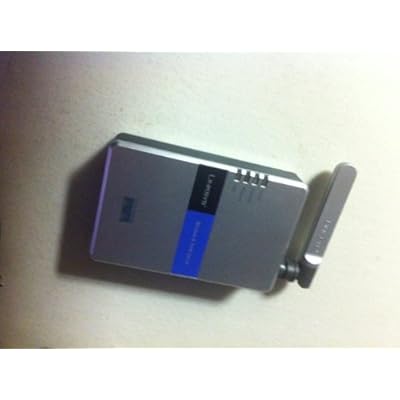
- Cisco-Linksys WPS54G Wireless-G 802.11g Print...
0 ratings

Artigo n.º:
10714691
Cisco-Linksys WPS54G Wireless-G 802.11g Print Server
Artigo n.º:
10714691
STD 1951340
Price Details
Excluding Shipping & Custom charges ( Shipping and custom charges will be calculated on checkout )
*All items will import from EUA
0 ratings
Escreva um comentário
Em estoque
 Importado da loja USA
QTY:
Encomende já e receba por volta de Monday, Julho 13
Transação segura
A Ubuy trabalha arduamente para proteger a sua segurança e privacidade. O nosso sistema avançado de segurança de pagamentos garante a confidencialidade ao encriptar as suas informações durante a transmissão, utilizando os protocolos AES (Normas de Encriptação Avançada) e SSL (Camada de Sockets Seguros). Os seus dados de pagamento estão 100% seguros, pois não partilhamos os seus dados de pagamento com vendedores terceiros.
Os nossos principais Parceiros Logísticos


Share a printer with everyone on your network

Fast
Shipping

Devolução
gratuita*

Embalagem Segura

Produtos 100% Originais

Certificação PCI DSS

Certificação ISO 27001


Note: Step Down Voltage Transformer required for using electronics products of EUA store (110-120). Recommended power converters Compre Agora.


O que se Destaca
Wireless Connectivity
Provides seamless wireless printing capability for multiple users without the need for extra cables, promoting easy placement anywhere within the Wi-Fi range.
Compatible Protocols
Supports various network protocols, ensuring compatibility with most printers and networks, making integration simpler and reducing setup complications.
User-Friendly Setup
Designed for quick and straightforward installation, minimizing user intervention needed for setup. This saves time and enhances user experience for both tech-savvy and novice users.
Detalhes do produto
- Share a printer with everyone on your network using most USB 1.1 or 2.0 printers
- Connect your printer to the network via 10/100 wired Ethernet or 54 Mbps Wireless-G (802.11g)
- Prevents congestion on your PC with other users' print jobs
- Eliminates the need to keep a PC on 24/7
- Cognitive Mesh technology intelligently optimizes mesh network performance based on real-time data
- Provides stable and high-speed whole-home coverage up to 3,000 sq. ft. with support for 200+ devices
| Item Weight | 1.3 lbs (590 grams) |
Quem Deverá Comprar?

-
Home Offices
Ideal for small home offices needing a reliable wireless print solution without complex network configurations.
-
Multiple Users
Great for households or small businesses where multiple users need access to a single printer wirelessly.
-
Budget-Conscious Users
Cost-effective solution for users looking to add wireless printing capabilities without investing in new printers.

-
High Volume Printing
Not suitable for heavy users requiring fast print speeds and high-capacity printing due to its limited performance.
-
Newer Technology
Users needing support for the latest wireless standards like 802.11n or 802.11ac may find it inadequate.
-
Advanced Networking Needs
Not ideal for complex network environments requiring advanced features like IP filtering or multiple SSIDs.
DESCRIÇÃO DO PRODUTO
Cisco-Linksys WPS54G Wireless-G 802.11g Print Server
About This Item
Introducing the Cisco-Linksys WPS54G Wireless-G 802.11g Print Server - the ultimate solution to sharing a printer with everyone on your network. With this print server, you no longer have to worry about connecting your printer directly to a single computer or leaving a PC on 24/7. This print server is compatible with most USB 1.1 or 2.0 printers, allowing you to effortlessly share your printer with all users on the network.
You can connect your printer directly to the network using either a 10/100 wired Ethernet connection or a 54 Mbps Wireless-G (802.11g) connection. One of the standout features of the Cisco-Linksys WPS54G is that it prevents congestion on your PC with other users' print jobs. This means that you can continue working without any interruption, even when multiple print jobs are being sent to the printer.
Enjoy the convenience of wireless printing with the Cisco Linksys WPS54G Wireless-G 802.11g Print Server. With its seamless compatibility with Cisco Linksys devices, you can easily set up and configure this print server to work seamlessly with your existing network. Upgrade your printing experience with the Cisco-Linksys WPS54G Wireless-G 802.11g Print Server today.
Say goodbye to the hassle of connecting your printer to a single computer and embrace the ease and convenience of network printing.
Tem alguma Dúvida? Converse connosco
Perguntas e Respostas dos Clientes
-
pergunta:
What is the Cisco-Linksys WPS54G Wireless-G Print Server?
Resposta: The Cisco-Linksys WPS54G is a wireless print server designed for 802.11g Wi-Fi networks, enabling multiple users to connect to a single printer over a wireless connection. This device is ideal for both home offices and small businesses, allowing for easier resource sharing without the need for lengthy USB cables. By connecting your printer to the network, it allows multiple devices to send print jobs wirelessly, enhancing productivity and convenience. -
pergunta:
How do I set up the Cisco-Linksys WPS54G Print Server?
Resposta: Setting up the Cisco-Linksys WPS54G involves connecting it to your printer and your wireless network. Start by ensuring your printer is compatible and powered on. Connect the print server to the printer using a USB cable, then follow the setup wizard provided on the disc or through the web interface. You will configure the wireless settings to match your network, making the printer accessible to all devices on the Wi-Fi. This allows seamless printing without the need for direct connection. -
pergunta:
What types of printers are compatible with the WPS54G Print Server?
Resposta: The Cisco-Linksys WPS54G supports a variety of printers, provided they have USB interfaces. Most inkjet and laser printers from major brands like HP, Canon, and Epson are compatible. It's recommended to check your printer’s specifications for USB support and to consult the print server's compatibility list. This ensures that you can effectively utilize the print server for your printing needs without any compatibility issues. -
pergunta:
Can I use the WPS54G with a network that has a different Wi-Fi standard?
Resposta: Yes, the Cisco-Linksys WPS54G is designed to work with 802.11g Wi-Fi networks, but it is also compatible with 802.11b, allowing it to connect to broader wireless networks. However, performance may vary based on the network environment. This flexibility allows you to integrate the print server into mixed Wi-Fi environments, ensuring you can still share a printer without major disruptions to your workflow. -
pergunta:
Do I need to install drivers for using the WPS54G Print Server?
Resposta: Yes, to effectively utilize the Cisco-Linksys WPS54G Print Server, you may need to install the appropriate drivers for your printer on each computer that will access the printer. These drivers ensure that the documents are sent correctly to the print server for wireless printing. Make sure to download the latest drivers from the printer manufacturer's website to prevent compatibility issues and achieve optimal performance. -
pergunta:
How do I troubleshoot connection issues with the WPS54G Print Server?
Resposta: If you experience connection issues with the Cisco-Linksys WPS54G, first ensure that the print server is within range of your Wi-Fi router. Check the power status and connections, including the USB between the printer and the server. Restart both the print server and your printer, and then reconnect to your wireless network. If problems persist, accessing the print server’s configuration page can help diagnose further connectivity issues or signal strength problems. -
pergunta:
Is the WPS54G Print Server secure for wireless printing?
Resposta: Yes, the Cisco-Linksys WPS54G comes with built-in security features such as WPA/WPA2 encryption, helping protect your network and print jobs from unauthorized access. It's recommended to keep your wireless network secured with a strong password and regularly update your network settings. This ensures that your printing activities remain private and secure, especially in shared environments or where sensitive documents may be printed. -
pergunta:
What is the range of the Cisco-Linksys WPS54G Print Server?
Resposta: The effective range of the Cisco-Linksys WPS54G Print Server depends significantly on the strength of your wireless network and the environment. Typically, this device can cover up to 100 meters indoors and 300 meters outdoors in a clear line of sight. To maximize its range, position the print server strategically, avoiding obstacles that could interfere with the Wi-Fi signal, ensuring all users have stable access to the printer. -
pergunta:
Can multiple users print simultaneously with the WPS54G Print Server?
Resposta: Yes, the Cisco-Linksys WPS54G allows multiple users to send print jobs to the connected printer simultaneously. This feature is particularly beneficial in office settings where multiple employees require access to shared printing resources. The print server manages the incoming print jobs efficiently, queuing them up for printing, which reduces bottlenecks and enhances productivity among users. -
pergunta:
Where can I buy the Cisco-Linksys WPS54G Wireless-G Print Server in São Tomé and Príncipe?
Resposta: You can conveniently purchase the Cisco-Linksys WPS54G Wireless-G Print Server from Ubuy in São Tomé and Príncipe. Ubuy offers a seamless online shopping experience, ensuring you can access a variety of tech products including the print server. With Ubuy’s competitive offerings and user-friendly platform, you can find and order the right printing solution without any hassle.
Linksys Print Servers Editorial Review
The Cisco-Linksys WPS54G Wireless-G Print Server claims to make your printer wireless, but it has mixed reviews. Some users have found success with this product, while others have encountered difficulties in installation and compatibility. It is important to note that this device was last manufactured in 2013 and is not supported by the manufacturer. Overall, it may not be the most reliable option for wireless printing.
Avaliações e Classificações dos Clientes
1 classificações de clientes
-
5 Estrela
100%
-
4 Estrela
0%
-
3 Estrela
0%
-
2 Estrela
0%
-
1 Estrela
0%
Avaliar este produto
Partilhe as suas ideias com outros clientes
Histórico de preços do produto
Informação importante
- Limitações: para produtos expedidos internacionalmente, tenha em atenção que qualquer garantia do fabricante pode não ser válida; opções de serviço do fabricante podem não estar disponíveis; manuais de produtos, instruções e avisos de segurança podem não estar nas línguas do país de destino; os produtos (e materiais que o acompanham) pode não ter sido concebido em conformidade com as normas, especificações e requisitos de rotulagem do país de destino; e os produtos podem não estar em conformidade com a voltagem e outras normas elétricas do país de destino (requerendo assim o uso de um adaptador ou conversor caso seja apropriado). O destinatário é responsável por garantir que o produto pode ser legalmente importado para o país de destino. Quando encomenda à Ubuy ou aos seus afiliados, o destinatário é o importador de registo e deve estar em conformidade com todas as leis e regulamentos do país de destino.
- Nem todos os produtos listados na Ubuy estão à venda, uma vez que a Ubuy é um motor de busca global. Os produtos estão sujeitos a leis de exportação/comércio.
STD 1951340
Encomende já e receba por volta de Monday, Julho 13
Este artigo não está restrito no meu país. (Clique no link acima se este artigo não estiver restrito no seu país, para que a nossa equipa o analise e permita.)
QTY:
Transação segura
A Ubuy trabalha arduamente para proteger a sua segurança e privacidade. O nosso sistema avançado de segurança de pagamentos garante a confidencialidade ao encriptar as suas informações durante a transmissão, utilizando os protocolos AES (Normas de Encriptação Avançada) e SSL (Camada de Sockets Seguros). Os seus dados de pagamento estão 100% seguros, pois não partilhamos os seus dados de pagamento com vendedores terceiros.
Os nossos principais Parceiros Logísticos
Entrega internacional mais rápida
Recursos e benefícios
- Connects your printer directly to the network
- Compatible with most USB 1.1 or 2.0 printers
- Prevents congestion on your PC
- Works with both wired Ethernet and wireless connections
- No need to leave a PC on 24/7