0 ratings

Artigo n.º:
28880160
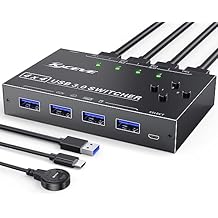
USB 3.0 Switch Selector 4 Port,MLEEDA KVM Switcher 4 Computers Sharing 4 USB Devices,USB Peripheral Switcher for Keyboard Mouse Printer Scanner,with
Artigo n.º:
28880160
STD 1100695
Price Details
Excluding Shipping & Custom charges ( Shipping and custom charges will be calculated on checkout )
*All items will import from EUA
0 ratings
Escreva um comentário
Em estoque
 Importado da loja USA
QTY:
Este produto não é Concretizado pela Ubuy e a entrega pode demorar um mínimo de 10 dias. Podemos cancelar o produto da encomenda e fazer-lhe um reembolso se surgir algum problema com este produto.
Transação segura
A Ubuy trabalha arduamente para proteger a sua segurança e privacidade. O nosso sistema avançado de segurança de pagamentos garante a confidencialidade ao encriptar as suas informações durante a transmissão, utilizando os protocolos AES (Normas de Encriptação Avançada) e SSL (Camada de Sockets Seguros). Os seus dados de pagamento estão 100% seguros, pois não partilhamos os seus dados de pagamento com vendedores terceiros.
Os nossos principais Parceiros Logísticos


Control 2 computers with one set of mouse and keyboard, 2 computers share one monitor

Fast
Shipping

Devolução
gratuita*

Embalagem Segura

Produtos 100% Originais

Certificação PCI DSS

Certificação ISO 27001


Note: Step Down Voltage Transformer required for using electronics products of EUA store (110-120). Recommended power converters Compre Agora.


O que se Destaca
Multi-Computer Sharing
Easily switch between four computers to share USB devices, enhancing efficiency for users needing seamless control in multi-device environments.
Fast Data Transfer
Supports USB 3.0 technology for high-speed data transfers, ensuring rapid file sharing between connected devices without lag or interruptions.
Convenient Remote Control
Includes a wired remote button for effortless toggling between computers, simplifying operations and minimizing physical hassle when accessing various peripherals.
Detalhes do produto
| Peso do Item | 1 lbs (450 gramas) |
Quem Deverá Comprar?

-
Trabalhadores de Escritório
Ideal for users managing multiple computers while needing to switch keyboards and mice efficiently.
-
Home Office Setup
Great for individuals in a home office who want to connect various devices like printers and scanners.
-
Entusiastas de Tecnologia
Perfect for tech users who require easy access to multiple computers for testing or development work.

-
Single Computer Users
Not suitable for individuals using one computer without the need for multiple device sharing.
-
High-Speed Gaming
May not provide the best performance for gamers needing ultra-low latency connections.
-
Usuários Ocasionalmente
Not practical for users who rarely need to switch between USB devices or computers.
DESCRIÇÃO DO PRODUTO
USB 3.0 Switch Selector 4 Port,MLEEDA KVM Switcher 4 Computers Sharing 4 USB Devices,USB Peripheral Switcher for Keyboard Mouse Printer Scanner,with Wired Remote Button and 4 USB 3.0 Cable
About This Item
Introducing our KVM Switch HDMI 2 Port Box, the ultimate solution for those looking to streamline their workstation and maximize efficiency. With this versatile switch, you can easily share one set of wired or wireless keyboard and mouse, as well as one monitor, between two computers or laptops. Our KVM switch utilizes advanced technology, including a high-precision encryption chip and gold-plated interfaces, ensuring optimal compatibility and durability.
You can trust that it will work seamlessly to control your PCs without any complications. One of the standout features of our switch is its ability to wake up your computer from hibernation using just the keyboard and mouse. This convenient functionality allows you to quickly resume work without any delays.
Additionally, our switch supports wired or wireless keyboards and mice, giving you flexibility in your setup. Thanks to its HDCP standard and adaptive EDID/HDCP decryption, our switch can adapt to complex application environments, ensuring a smooth and stable image display. It also has a built-in automatic adjustment system to further enhance image quality. Not only is our switch incredibly functional, but it is also incredibly easy to use. You won't need to install any drivers and it supports hot plug, making it a hassle-free addition to your workstation.
Plus, it is powered via USB, eliminating the need for a separate power adapter. Please note that our switch is specifically designed to support keyboards and mice, and may not recognize other USB devices such as USB cameras, printers, or U disks. If you experience any issues with your keyboard and mouse, we recommend updating the USB drivers on your computer. To ensure the best performance and support for resolutions above 1080p or 4K, we recommend using an HDMI 2.0 cable. HDMI 1.4 cables may not be able to handle higher resolutions effectively. We understand that you may have some specific compatibility concerns, and we're here to address them.
Our switch is compatible with computer DVI or Displayport interfaces, but you will need a DVI to HDMI cable and a Displayport to HDMI converter (not included in the package). Additionally, our switch supports Mac Mini, but you may need to adjust the resolution of your Mac Mini to 1920*1080p@60hz. If your device resolution exceeds our standard, we recommend downscaling the resolution for optimal performance. Experience seamless control and enhanced productivity with our KVM Switch HDMI 2 Port Box.
Upgrade your workstation today and take your efficiency to new heights. Shop now and enjoy the benefits of a clutter-free and streamlined setup.
Tem alguma Dúvida? Converse connosco
Perguntas e Respostas dos Clientes
-
pergunta:
What is a Displayport Dual Monitor KVM Switch?
Resposta: A Displayport Dual Monitor KVM Switch allows you to control two monitors and multiple computers from a single set of peripherals (keyboard and mouse). This device supports high resolutions, including 8K at 60Hz and 4K at 144Hz, ensuring a smooth visual experience whether you’re working or gaming. It's ideal for professionals who need to switch between systems frequently without the hassle of multiple setups. -
pergunta:
What are the benefits of using the MLEEDA KVM Switch?
Resposta: The MLEEDA KVM Switch enhances productivity by allowing seamless switching between three computers while supporting two monitors. The four USB 3.0 ports enable fast connections for additional devices like printers or external drives. This functionality is particularly beneficial for gamers or designers who require robust performance across multiple systems without sacrificing display quality. -
pergunta:
Can I use the KVM switch with different operating systems?
Resposta: Yes, the MLEEDA KVM Switch is compatible with various operating systems including Windows, macOS, and Linux. This flexibility allows you to integrate different computers into your workspace seamlessly. Users who work with diverse platforms often find this feature particularly valuable as it supports a more unified workflow. -
pergunta:
How do I connect my devices to the KVM switch?
Resposta: Connecting your devices to the MLEEDA KVM Switch is straightforward. You’ll connect your computers to the HDMI or DisplayPort inputs, and then attach your monitors and USB peripherals to the respective ports. This setup allows quick toggling between devices, making it straightforward for users who need to access different systems rapidly throughout their workday. -
pergunta:
Does the KVM Switch support audio output?
Resposta: Yes, the MLEEDA KVM Switch supports audio output alongside video, providing a full multimedia experience. This means you won’t need additional audio cables or setups, making your workspace more organized. It's perfect for those who engage in activities that require sound, like streaming, gaming, or video conferencing, as it simplifies your audio management. -
pergunta:
What resolutions does the MLEEDA KVM Switch support?
Resposta: The MLEEDA KVM Switch supports impressive resolutions, up to 8K at 60Hz and 4K at 144Hz. Such high-definition video output is ideal for gamers and graphics professionals who need sharp images and fluid motion. This feature ensures that you can enjoy your multimedia experiences without compromising on quality, enhancing your overall usage experience. -
pergunta:
Can this KVM switch be used for gaming?
Resposta: Absolutely. The high refresh rates and resolution support of the MLEEDA KVM Switch make it excellent for gaming. Gamers can enjoy their favorite titles on dual monitors without lag or distortion. This switch allows seamless transitions between gaming consoles or PCs, providing an enhanced gaming setup that maximizes performance and responsiveness. -
pergunta:
What types of connectivity does the KVM switch offer?
Resposta: The MLEEDA KVM Switch offers a combination of DisplayPort and USB connections, allowing for a broad range of devices to be connected simultaneously. Such versatility ensures that you can connect everything from monitors and keyboard/mouse setups to external drives. This is especially useful for content creators who rely on multiple peripherals for their projects. -
pergunta:
How does the switch handle multiple monitors?
Resposta: The MLEEDA KVM Switch can efficiently manage dual monitors by duplicating or extending displays depending on your setup preference. This capability is ideal for users who require extensive screen real estate for multitasking or for immersive gaming experiences. You can easily switch between different dual monitor setups, catering to varied tasks or preferences. -
pergunta:
Where can I buy the Displayport Dual Monitor KVM Switch?
Resposta: You can buy the Displayport Dual Monitor KVM Switch from Ubuy, which offers a wide range of tech products including this model. Ubuy provides convenient options for browsing and purchasing, making it easy to find what you need. With a straightforward user interface and quick access to product information, Ubuy is a reliable platform for your tech shopping.
MLEEDA KVM Switches Editorial Review
Nenhuma revisão editorial encontrada
Avaliações e Classificações dos Clientes
1 classificações de clientes
-
5 Estrela
100%
-
4 Estrela
0%
-
3 Estrela
0%
-
2 Estrela
0%
-
1 Estrela
0%
Avaliar este produto
Partilhe as suas ideias com outros clientes
Platform Trust & Buyer Confidence

MT
Mohd
Verified buyer
“The product received very good packaging & safe…Thank You”
16 June 2026 · via Trustpilot
SJ
Shawati
Verified buyer
“Accurate delivery timing given”
16 June 2026 · via Trustpilot
YB
Youcef
Verified buyer
“Not madly expensive like I thought, and much quicker than promised.”
15 June 2026 · via Trustpilot
LM
Leila
Verified buyer
“Never dealt with Ubuy before, but everything worked out great. Seamless cross border purchasing and shipping. Thanks!”
6/7/2026 · via Trustpilot
KA
Kwame
Verified buyer
“The process was smooth, with clear communication and timelines. This was my 1st purchase and I am really impressed. I will definitely be coming back.”
12 June 2026 · via Trustpilot
Checkout Seguro
Global Delivery
Devoluções Fáceis
Genuine Products
Histórico de preços do produto
Informação importante
- Limitações: para produtos expedidos internacionalmente, tenha em atenção que qualquer garantia do fabricante pode não ser válida; opções de serviço do fabricante podem não estar disponíveis; manuais de produtos, instruções e avisos de segurança podem não estar nas línguas do país de destino; os produtos (e materiais que o acompanham) pode não ter sido concebido em conformidade com as normas, especificações e requisitos de rotulagem do país de destino; e os produtos podem não estar em conformidade com a voltagem e outras normas elétricas do país de destino (requerendo assim o uso de um adaptador ou conversor caso seja apropriado). O destinatário é responsável por garantir que o produto pode ser legalmente importado para o país de destino. Quando encomenda à Ubuy ou aos seus afiliados, o destinatário é o importador de registo e deve estar em conformidade com todas as leis e regulamentos do país de destino.
- Nem todos os produtos listados na Ubuy estão à venda, uma vez que a Ubuy é um motor de busca global. Os produtos estão sujeitos a leis de exportação/comércio.
STD 1100695
Este produto não é Concretizado pela Ubuy e a entrega pode demorar um mínimo de 10 dias. Podemos cancelar o produto da encomenda e fazer-lhe um reembolso se surgir algum problema com este produto.
Este artigo não está restrito no meu país. (Clique no link acima se este artigo não estiver restrito no seu país, para que a nossa equipa o analise e permita.)
QTY:
Transação segura
A Ubuy trabalha arduamente para proteger a sua segurança e privacidade. O nosso sistema avançado de segurança de pagamentos garante a confidencialidade ao encriptar as suas informações durante a transmissão, utilizando os protocolos AES (Normas de Encriptação Avançada) e SSL (Camada de Sockets Seguros). Os seus dados de pagamento estão 100% seguros, pois não partilhamos os seus dados de pagamento com vendedores terceiros.
Os nossos principais Parceiros Logísticos
Entrega internacional mais rápida
Recursos e benefícios
- Supports wired or wireless keyboard and mouse
- HDMI 2.0 cable required for 1080p above or 4k resolution
- No need to install the driver, support hot plug
- Compatible with Windows, Mac OS, Linux, and Chrome OS
- Supports 4K@30Hz(YUV 4:4:4) chroma sampling and 3D
- Can wake up computer from hibernation using the keyboard and mouse