- Pagina inicial /
- Produtos de Escritório /
- Eletrónica de Escritório /
- Impressoras e Acessórios /
- Impressoras /
- Impressoras Laser /
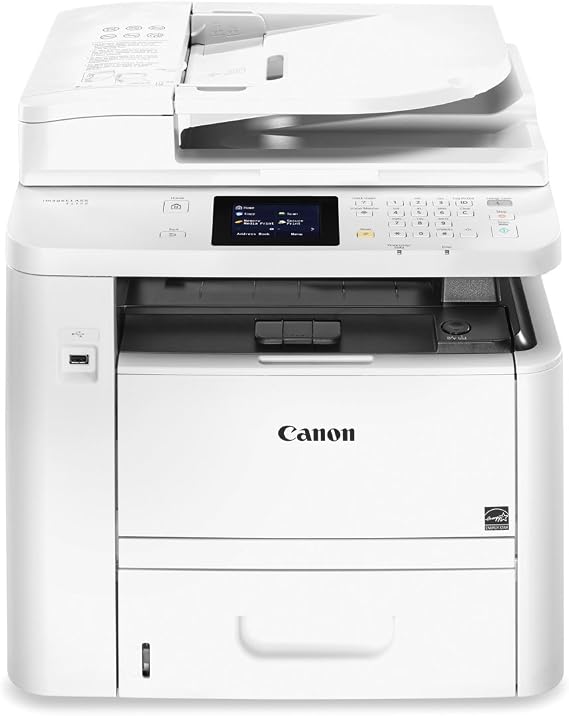
- Canon imageCLASS D1620 (2223C024) Multifuncti...
0 ratings


Artigo n.º:
2928676
Canon imageCLASS D1620 (2223C024) Multifunction, Wireless Laser Printer with AirPrint, 45 Pages Per Minute and
90% of respondents would recommend this to a friend
Artigo n.º:
2928676
STD 15163635
Detalhes do Preço
Excluindo custos de envio e alfandegários ( Os custos de envio e alfandegários serão calculados na finalização da compra )
*Todos os artigos serão importados de EUA
0 ratings
Escrever uma avaliação
Em stock
 Importado da loja USA
Qtd.:
Encomende já e receba por volta de Sexta-Feira, Outubro 16
Transação segura
A Ubuy trabalha arduamente para proteger a sua segurança e privacidade. O nosso sistema avançado de segurança de pagamentos garante a confidencialidade ao encriptar as suas informações durante a transmissão, utilizando os protocolos AES (Normas de Encriptação Avançada) e SSL (Camada de Sockets Seguros). Os seus dados de pagamento estão 100% seguros, pois não partilhamos os seus dados de pagamento com vendedores terceiros.
Os nossos principais Parceiros Logísticos


The imageCLASS D1620 balances speedy performance, minimal maintenance, and the ability to expand paper capacity for busy groups.

Fast
Shipping

Devolução
gratuita*

Embalagem Segura

Produtos 100% Originais

Certificação PCI DSS

Certificação ISO 27001



Note: Step Down Voltage Transformer required for using electronics products of EUA store (110-120). Recommended power converters COMPRAR AGORA.


O que se Destaca
High-Speed Printing
Achieve rapid printing speeds of up to 45 pages per minute, saving time and enhancing productivity for busy work environments.
Wireless Convenience
Enjoy seamless wireless printing with AirPrint compatibility, allowing users to print documents directly from their mobile devices without the hassle of wired connections.
Multifunctional Capabilities
This all-in-one solution combines printing, scanning, copying, and faxing, making it a versatile choice for offices that require various functions in a single device.
Detalhes do produto
| Printer Type | Laser |
| Other Special Features of the Product | Not_Performance_Used |
| Printer Output Type | Monochrome |
| Item Weight | 42 pounds (19.05 kg) |
| Controller Type | iOS |
| Print media | Envelopes, Paper (plain) |
| Scanner Type | Automatic Document Feeder (ADF) |
| Maximum Copy Speed Black and White | 35 pages_per_minute |
| Compatible Devices | Smartphones |
| Ink Color | black |
| Additional Printer Functions | Copy |
| Control Method | Touch |
| Number of Trays | 2 |
| Display Type | LCD |
| Resolution | 1200 x 1200, 600 x 600 |
| Color Pages per Minute | 35 |
| B&W Pages per Minute | 35 pages_per_minute |
| Color | White |
| Color Depth | 1 bpp |
| Printer Connectivity Type | Ethernet |
| Hardware Interface | USB 2.0 |
| Total Usb Ports | 1 |
| Duplex | Automatic |
| Brand | Canon |
| Model Name | Canon imageCLASS |
| Model Number | D1620 |
| Built-In Media | D1520 Product, Power Cord, Starter Cartridge 120 (Starter Yield: 2,300 sheets, ISO/IEC), Starter Guide, User Software DVD-ROM, Warranty Card |
| Series Number | 1620 |
| Model Series | imageCLASS |
| Specific Uses For Product | Office, business |
| UPC | 779184006602 013803311662 013803253535 |
| Unit Count | 1 Count |
| Global Trade Identification Number | 00013803253535 |
| Item Type Name | Laser Printer |
| Manufacturer | Canon USA (Lasers) |
| Maximum Media Size | 8.5 x 14 inch (21.6 cm) |
| Maximum Sheet Capacity | 250 |
| Paper Size | 8.5 inch x 14 inches (21.6 cm) |
| Maximum print Resolution Color | 1200 x 1200 dpi |
| Maximum Print Resolution Black and White | 600 dots_per_inch (1524 cm) |
| Power Consumption | 1.4 watts |
| Wattage | 1.4 watts |
| Maximum Copy Resolution Color | 600 dpi |
| Maximum Copy Resolution Black and White | 600 dpi |
| Connectivity Technology | Ethernet |
| Printing Technology | Laser |
| Special Feature | Not_Performance_Used |
| Printer Output | Monochrome |
| Maximum Print Speed (Color) | 35 |
| Max Printspeed Monochrome | 35 pages_per_minute |
Quem Deverá Comprar?

-
Small Businesses
Ideal for small businesses needing efficient printing, copying, and scanning with high-speed output and wireless connectivity.
-
Home Offices
Perfect for remote workers requiring versatile functions and reliable performance without frequent paper replacement.
-
Educational Institutions
Great for schools or libraries needing to print volumes of documents quickly with high-quality laser printing.

-
Casual Users
Not suitable for casual users who need occasional printing due to its higher cost and advanced functionalities.
DESCRIÇÃO DO PRODUTO
Canon imageCLASS D1620 (2223C024) Multifunction, Wireless Laser Printer with AirPrint, 45 Pages Per Minute and
Tem alguma Dúvida? Converse connosco
Perguntas e respostas do cliente
-
Pergunta:
What are the main features of the Canon imageCLASS D1620 printer?
Resposta: The Canon imageCLASS D1620 is a multifunction wireless laser printer that offers printing, copying, scanning, and fax capabilities. It features fast printing speeds of up to 45 pages per minute, making it ideal for busy offices. The printer also supports AirPrint, allowing users to print directly from their iOS devices without additional software. Additionally, with its intuitive touchscreen interface, users can easily navigate various functions. This makes it a versatile choice for teams looking for efficiency and convenience in document handling. -
Pergunta:
How does AirPrint work on the Canon imageCLASS D1620?
Resposta: AirPrint allows seamless printing from Apple devices such as iPhones and iPads without needing to install drivers. When your device is connected to the same Wi-Fi network as the Canon imageCLASS D1620, you can select it as your printer from the share menu in compatible apps. This feature enhances user convenience, especially in settings where users need to print documents quickly and efficiently. Whether printing a report from a laptop or a boarding pass from a smartphone, AirPrint streamlines the process and saves time. -
Pergunta:
What types of media can the Canon imageCLASS D1620 print on?
Resposta: The Canon imageCLASS D1620 can print on various media types, including standard paper, envelopes, labels, and cardstock. It supports media sizes from A4 to legal formats, providing flexibility for different printing needs. This versatility is particularly beneficial for organizations that print marketing materials, proposals, and everyday documents. Keep in mind that using suitable media will ensure optimal print quality and prevent jams, ensuring the longevity of the printer. -
Pergunta:
Is the Canon imageCLASS D1620 suitable for a home office?
Resposta: Yes, the Canon imageCLASS D1620 is an excellent choice for a home office. With its multifunction capabilities and high-speed printing, it can handle a variety of tasks efficiently. Compact yet powerful, this printer can easily fit into your workspace while providing the performance needed for everyday printing tasks, from printing documents and reports to scanning important papers. Its wireless functionality also allows for easy connectivity with multiple devices in your home office setup. -
Pergunta:
What is the monthly duty cycle for the Canon imageCLASS D1620?
Resposta: The Canon imageCLASS D1620 has a monthly duty cycle of up to 30,000 pages, making it suitable for both personal and office use. This high capacity means that you can print large volumes with confidence, ensuring that the printer can keep up with demand during busy periods. Organizations with high printing needs can rely on this printer to maintain productivity while reducing the frequency of maintenance and supply replenishment. Just be sure to monitor your usage to stay within recommended limits to prolong the printer's lifespan. -
Pergunta:
How do I connect the Canon imageCLASS D1620 to my Wi-Fi network?
Resposta: To connect the Canon imageCLASS D1620 to your Wi-Fi network, you can use the printer’s built-in wireless setup wizard. From the control panel, select the Wi-Fi setup option, then follow the prompts to choose your network and enter the password. This wireless connectivity allows all compatible devices on the same network to access the printer, making it ideal for teams and shared office environments. Once set up, you can print from laptops, smartphones, and tablets without the hassle of cords. -
Pergunta:
Can the Canon imageCLASS D1620 scan documents to email?
Resposta: Yes, the Canon imageCLASS D1620 can scan documents directly to email. With its scanning capabilities, you can scan a document and select the email option to send it directly to recipients. This makes document sharing quick and efficient, especially for businesses that require immediate communication. Using the printer's user-friendly touchscreen display, you can manage scanning settings, creating PDFs or other file formats for your convenience. -
Pergunta:
What toner does the Canon imageCLASS D1620 use, and how often should it be replaced?
Resposta: The Canon imageCLASS D1620 uses Canon’s 055 toner cartridges, which come in both standard and high-yield options. The frequency of replacement depends on your printing volume, but with proper usage, the high-yield toner can print up to 9,000 pages. Monitoring print quality and page count will help you determine when to change the toner. Ensuring timely replacement will maintain print quality and prevent interruption in your printing tasks. -
Pergunta:
Does the Canon imageCLASS D1620 support double-sided printing?
Resposta: Yes, the Canon imageCLASS D1620 supports automatic duplex printing, allowing you to print on both sides of the paper without manual intervention. This feature is beneficial for reducing paper usage and costs, making it an eco-friendly choice. Organizations seeking to minimize their environmental impact while still achieving professional-quality printouts will find this feature especially valuable. It not only saves resources but also enhances presentation, especially for multi-page documents. -
Pergunta:
Where can I buy the Canon imageCLASS D1620?
Resposta: You can buy the Canon imageCLASS D1620 at Ubuy, your reliable online shopping platform. Ubuy offers a seamless purchasing experience, making it easy to find this multifunction wireless laser printer for all your office needs. With Ubuy, you can enjoy the convenience of shopping from home while having access to comprehensive product information to assist in your buying decision.
Canon Laser Printers D1620 Editorial Review
The Canon imageCLASS D1520 is a multifunctional laser copier that can handle various media sizes such as Letter, Legal, A4, A5, B5, Statement, Executive, Postcard, and Index Card. It can scan legal-sized paper and allows for scans to be sent via email. It can work as a stand-alone copier or be connected to a computer. Mobile printing is also possible through either paper tray, and the copier has a zoom feature. Overall, customers have had mixed experiences with the Canon imageCLASS D1520. Some have reported frequent malfunctions and slow print jobs, while others have praised its effectiveness and speed. The scanning capabilities have been a point of frustration for some. However, customers have appreciated the quietness, fast printing speed, and ease of installation and use.
Avaliações e Classificações dos Clientes
1 classificações de clientes
-
5 Estrela
100%
-
4 Estrela
0%
-
3 Estrela
0%
-
2 Estrela
0%
-
1 Estrela
0%
Avaliar este produto
Partilhe as suas ideias com outros clientes
Prós
- -Handles various media sizes -Can scan legal-sized paper -Mobile printing is possible -Fast printing speed -Quiet -Ease of installation and use
Contras
- -Frequent malfunctions reported -Scanning capabilities frustrating for some
CONFIANÇA NA PLATAFORMA E SEGURANÇA DO COMPRADOR

JK
Jasmin
Comprador verificado
“Great products and very good service: very easy and very fast international delivery.”
9 September 2026 · via Trustpilot
AG
Anke
Comprador verificado
“Wonderful online shopping experience, smooth transaction from the start. Payment method works conveniently and delivery is unexpectedly fast and reliable. You go the extra mile for service. What makes this even more amazing, you deliver to Namibia. I will remain a happy Ubuy customer and will increase my purchases for sure! Thank you!”
10 September 2026 · via Trustpilot
H
Hazel
Comprador verificado
“Very easy to find the products what you need, and so fast delivery, that’s why I highly recommended to others costumers to used ubuy.”
10 September 2026 · via Trustpilot
O
Opaleye
Comprador verificado
“I received exactly what I ordered I was skeptical about your site because that was my first time to order. But the order came timely and neatly packaged. I was not disappointed. Thank you.”
11 September 2026 · via Trustpilot
AC
Adele
Comprador verificado
“Easy to find and order what you want on the website. Delivery is quick to the UK”
8 September 2026 · via Trustpilot
Checkout Seguro
Entrega Global
Devoluções Fáceis
Produtos Genuínos
Histórico de preços do produto
Informação importante
- Limitações: para produtos expedidos internacionalmente, tenha em atenção que qualquer garantia do fabricante pode não ser válida; opções de serviço do fabricante podem não estar disponíveis; manuais de produtos, instruções e avisos de segurança podem não estar nas línguas do país de destino; os produtos (e materiais que o acompanham) pode não ter sido concebido em conformidade com as normas, especificações e requisitos de rotulagem do país de destino; e os produtos podem não estar em conformidade com a voltagem e outras normas elétricas do país de destino (requerendo assim o uso de um adaptador ou conversor caso seja apropriado). O destinatário é responsável por garantir que o produto pode ser legalmente importado para o país de destino. Quando encomenda à Ubuy ou aos seus afiliados, o destinatário é o importador de registo e deve estar em conformidade com todas as leis e regulamentos do país de destino.
- Nem todos os produtos listados na Ubuy estão à venda, uma vez que a Ubuy é um motor de busca global. Os produtos estão sujeitos a leis de exportação/comércio.
STD 15163635
Encomende já e receba por volta de Sexta-Feira, Outubro 16
Este artigo não está restrito no meu país. (Clique no link acima se este artigo não estiver restrito no seu país, para que a nossa equipa o analise e permita.)
Qtd.:
Transação segura
Em conformidade com a norma PCI DSS e com certificação ISO 27001:2022, com pagamentos encriptados e proteção total do comprador em todas as encomendas.
Os nossos principais Parceiros Logísticos
Entrega internacional mais rápida
Recursos e benefícios
- Print at speeds of up to 45 pages per minute
- Supports mobile solutions
- 5-Inch, Color Touch LCD for easy navigation
- Paper capacity allows for up to 2,300 sheets
- Ideal for small to mid-size workgroups
- First print in your hands in approximately 6 seconds.
Ubuy Assurance
Experience worry-free shopping with 100% original products, PCI DSS-compliant payment security, ISO 27001-certified data protection, the fastest cross-border delivery, free returns *, and secure packaging on every order.