- Home Page /
- Electronics /
- Computer Accessories /
- Computer Accessories & Peripherals /
- Keyboards, Mice & Accessories /
- Mice /
- 2PCS USB Mouse Jiggler Mover,USB Wireless Mou...
0 ratings







Item #:
144853446
2PCS USB Mouse Jiggler Mover,USB Wireless Mouse Wiggler (Touch Sensitive)-Laptop Mouse Motion Simulator with Adjustable Motion Patterns,for
Item #:
144853446
STD 429390
Price Details
Excluding Shipping & Custom charges ( Shipping and custom charges will be calculated on checkout )
*All items will import from US
In stock
 Imported from USA store
QTY:
Only 18 items left in stock.
Order now and get it around Thursday, July 02
Secured transaction
Ubuy works hard to protect your security and privacy. Our advanced payment security system ensures confidentiality by encrypting your information during transmission using AES (Advanced Encryption Standards) and SSL (Secure Socket Layer) protocols. Your payment details are 100% secure as we do not share your payment details with third party sellers.
Our Top Logistics Partners


Keep your tasks running smoothly without any hiccups with this simple plug-and-play solution.

Fast
Shipping

Free
Return*

Secure Packaging

100% Original Products

PCI DSS Compliance

ISO 27001 Certified


Note: Step Down Voltage Transformer required for using electronics products of US store (110-120). Recommended power converters Buy Now.


What Stands Out
Touch Sensitive
The touch-sensitive design allows for realistic mouse movement, enhancing user experience during presentations or surveillance, making it perfect for professionals needing seamless operation.
Adjustable Patterns
Customizable motion patterns provide users with flexibility, catering to various scenarios, from home to office environments, ensuring optimal functionality based on individual needs.
USB Wireless
Convenient wireless connectivity eliminates desk clutter and enhances portability, making it ideal for travel or remote work, delivering quality performance in any setting.
Product Details
- 【USB Mouse Jiggler Mover】It ensures that your computer doesn't go to sleep or lock, and you can trust it to keep your tasks running smoothly without any hiccups.Can be away from the computer for more than five minutes, or even sit in front of the computer and read a document without having to move the mouse to stay logged in.
- With three jiggler modes and 100% undetectability, this little guy is like a stealthy mouse-moving magician. 1. Rectangular cursor path 2. Minor micro movements (without interference for normal use) 3. Left-right swaying motion
- 【Operation Method】 Insert USB port (LED red indicator light automatically lights up) Click the back button to switch the shaking mode (1 click=1 mode change) Long press (3s) to turn on/off the power
- 【Perfect compatibility】This USB mouse jitter is compatible with almost all computer systems on the market, such as laptops, desktop computers, all-in-one computers and USB hubs connected to the computer can be perfectly adapted.
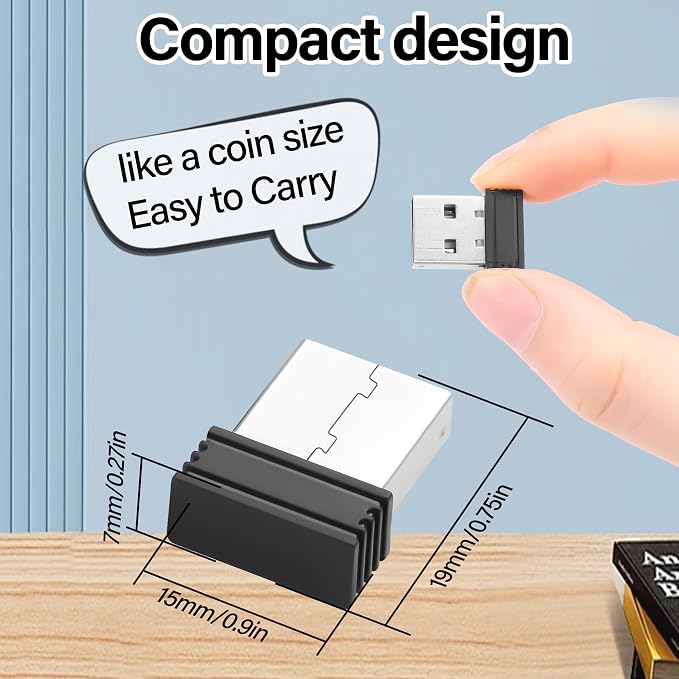
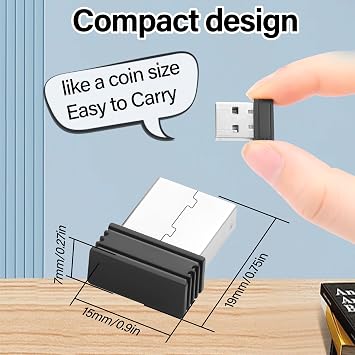
- 【Plug and play convenience】The compact design is a bonus. It's small and discreet, so it doesn't clutter up workspace. Plus, it's easy to take with you when you on the go.just plug it in, and you're good to go. No complicated setup or software installation required.
| Connectivity Technology | USB |
| Additional Features | Portable |
| Movement Detection | NO |
| Compatible Devices | Laptop, Desktop |
| Style Name | (Touch) |
| Brand | JSADZKJ |
| Antenna Location | Office |
| Are Batteries Included | No |
| Are Batteries Required | No |
| Manufacturer | shenzhenshi jinshengan dianzikeji youxiangongsi |
| Mfr Part Number | 25048 |
| Special Feature | Portable |
| Movement Detection Technology | NO |
| Recommended Uses For Product | Office |
| Item Weight | 0.5 lbs (230 grams) |
Who Should Buy?

-
Remote Workers
Ideal for remote workers wanting to prevent screens from sleeping during video calls or long tasks.
-
Security Personnel
Useful for security professionals monitoring computer activity without triggering inactivity screensaver.
-
Gamers
Great for gamers who want to keep their presence active in online games while taking breaks.

-
Casual Users
Not suitable for casual users who do not need to keep their system active frequently.
-
Short Sessions
Inappropriate for users engaged in short computing sessions, where inactivity may not be an issue.
-
Tech-Savvy Users
Tech-savvy individuals may find it unnecessary, preferring manual control over their systems instead.
Product Description
Have any Query? Chat with us
Customer Questions & Answers
-
Question:
What is a USB mouse jiggler and how does it work?
Answer: A USB mouse jiggler is a device designed to simulate mouse movement on your computer. It connects via USB and sends signals to the computer to mimic cursor movement, preventing the screen from entering sleep mode or locking due to inactivity. This is particularly useful during long meetings, presentations, or when you need to keep your computer awake while performing tasks like downloads. By utilizing adjustable motion patterns, users can customize the jiggler to fit their specific needs and preferences. -
Question:
What are the benefits of using a touch-sensitive mouse wiggler?
Answer: A touch-sensitive mouse wiggler provides an intuitive way to control your computer's cursor movement. Unlike traditional mouse jigglers, which might only simulate static patterns, touch sensitivity allows for more realistic movement. This feature is beneficial for users who need to maintain active engagement with their computer during idle periods, such as during streaming or coding sessions. The adjustable motion patterns also enable users to tailor the movement style to suit various scenarios, enhancing productivity. -
Question:
Is the USB mouse jiggler compatible with all operating systems?
Answer: Yes, the USB mouse jiggler is typically compatible with major operating systems including Windows, MacOS, and Linux. Its plug-and-play design means that you simply need to plug it into a USB port, and it automatically starts functioning without the need for additional software installation. This wide compatibility makes it an ideal choice for users across different platforms, ensuring that whether you're using a laptop or desktop, you can keep your system awake effortlessly. -
Question:
Can I adjust the motion patterns on the USB mouse jiggler?
Answer: Yes, the USB mouse jiggler comes with adjustable motion patterns that allow you to personalize how the simulator moves the cursor. Users can choose from various preset patterns or configure their own to suit specific tasks or preferences. This customization is particularly useful for different work environments—whether you want subtle movements during a presentation or more pronounced jiggling during downloads. Such flexibility can enhance productivity and user comfort. -
Question:
How does using a mouse mover help in preventing computer sleep mode?
Answer: Utilizing a mouse mover helps prevent your computer from entering sleep mode by generating non-stop cursor movement. This constant activity tricks the computer into thinking that you're actively using it, which can be critical during long downloads, installations, or automated processes. By keeping the system awake, you can ensure that tasks complete without interruptions, thereby saving time and maintaining workflow efficiency. -
Question:
Is the USB wireless mouse jiggler portable?
Answer: Absolutely! The USB wireless mouse jiggler is designed with portability in mind. Its compact size allows you to easily carry it around, making it suitable for use in office settings, home offices, or even when you’re on the go. The wireless aspect eliminates any clutter from cables, enhancing convenience, especially when switching between devices. This portability ensures you can effortlessly maintain your computer’s activity wherever you are. -
Question:
How do I set up the USB mouse wiggler on my laptop?
Answer: Setting up the USB mouse wiggler on your laptop is quite straightforward. First, simply plug the device into an available USB port on your laptop. The jiggler will automatically be recognized, and you can start using it immediately. Depending on the model, you might have options to adjust motion patterns. This simplicity makes it user-friendly, allowing you to enhance your productivity without any complex setup or configuration. -
Question:
What types of environments are best suited for a mouse motion simulator?
Answer: Mouse motion simulators are ideal for a variety of environments such as corporate settings, home offices, and creative workspaces. They are especially beneficial in situations where maintaining computer activity is crucial, such as during lengthy video conferences, automated processes, or while working on essential tasks that cannot afford interruptions. In these settings, a motion simulator can significantly enhance productivity while ensuring that your devices remain active. -
Question:
Can multiple users utilize the same USB mouse jiggler?
Answer: Yes, a single USB mouse jiggler can be shared by multiple users as it is a plug-and-play device. However, it will need to be unplugged and reinserted into the respective users' systems to switch between them. This is particularly useful in a shared workspace where users can use it as needed to keep their computers awake during collaborative work sessions. Just make sure that users adjust the motion patterns based on their individual preferences. -
Question:
Where can I buy the 2PCS USB Mouse Jiggler Mover in São Tomé and Príncipe?
Answer: You can conveniently purchase the 2PCS USB Mouse Jiggler Mover from Ubuy in São Tomé and Príncipe. Ubuy offers a reliable platform for acquiring a wide variety of electronic and office gadgets, including the mouse wiggler. Their user-friendly interface and comprehensive product descriptions help you make informed choices easily, ensuring that you get the right tools to enhance your productivity.
JSADZKJ Mice Editorial Review
No editorial reviews found
Customer Reviews & Ratings
1 customers ratings
-
5 Star
100%
-
4 Star
0%
-
3 Star
0%
-
2 Star
0%
-
1 Star
0%
Review this product
Share your thoughts with other customers
Pros
- Easy to use
- Variety of motion patterns
- Touch-sensitive feature
- Wireless convenience
- Compact and portable
Cons
- Occasional connectivity issues
Product Price History
Important information
- Limitations : For products shipped internationally, please note that any manufacturer warranty may not be valid; manufacturer service options may not be available; product manuals, instructions, and safety warnings may not be in destination country languages; the products (and accompanying materials) may not be designed in accordance with destination country standards, specifications, and labeling requirements; and the products may not conform to destination country voltage and other electrical standards (requiring use of an adapter or converter if appropriate). The recipient is responsible for assuring that the product can be lawfully imported to the destination country. When ordering from Ubuy or its affiliates, the recipient is the importer of record and must comply with all laws and regulations of the destination country.
- Not all the products listed on Ubuy are for sale, as Ubuy is a global search engine. Products are subject to export/trade regulations.
STD 429390
Order now and get it around Thursday, July 02
This item is not restrict in my country.(Please click on above link if this item is not restrict in your country, So our team will review and allow.)
QTY:
Only 18 items left in stock.
Secured transaction
Ubuy works hard to protect your security and privacy. Our advanced payment security system ensures confidentiality by encrypting your information during transmission using AES (Advanced Encryption Standards) and SSL (Secure Socket Layer) protocols. Your payment details are 100% secure as we do not share your payment details with third party sellers.
Our Top Logistics Partners
Fastest cross-border delivery
Features & Benefits
- Simulates mouse movement to prevent sleep mode, screen saver, or lock.
- Plug-and-play design with no drivers or software needed.
- Compatible with all computer systems including laptops and desktops.
- Compact and discreet, ideal for on-the-go users.
- Automatically swings the mouse back and forth after insertion.
- Ensures uninterrupted workflow without manual mouse movement.