0 ratings

Item #:
89731537
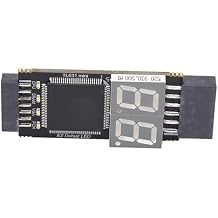
Motherboard Diagnostic Card PCIe LPC DEBUG Tester Kit with LED Indicator for Computer Repair and PC Hardware
Item #:
89731537
STD 928500
Price Details
Excluding Shipping & Custom charges ( Shipping and custom charges will be calculated on checkout )
*All items will import from US
0 ratings
Write a review
In stock
 Imported from USA store
QTY:
Order now and get it around Friday, July 03
Secured transaction
Ubuy works hard to protect your security and privacy. Our advanced payment security system ensures confidentiality by encrypting your information during transmission using AES (Advanced Encryption Standards) and SSL (Secure Socket Layer) protocols. Your payment details are 100% secure as we do not share your payment details with third party sellers.
Our Top Logistics Partners


This motherboard diagnostic card offers strong compatibility and high performance, featuring multiple LED indicators for comprehensive diagnostics.

Fast
Shipping

Free
Return*

Secure Packaging

100% Original Products

PCI DSS Compliance

ISO 27001 Certified


Note: Step Down Voltage Transformer required for using electronics products of US store (110-120). Recommended power converters Buy Now.


What Stands Out
LED Diagnostic Indicators
Provides real-time visual feedback on motherboard diagnostics with LED lights, allowing quick identification of errors and issues without needing to power on the system.
Versatile Compatibility
Supports multiple interface protocols including PCIe, LPC, and Serial Comm, making it suitable for a wide range of motherboard types and ensuring comprehensive testing options.
User-Friendly Interface
Designed with intuitive operation in mind, the diagnostic tester allows users to easily monitor performance and troubleshoot problems, making it ideal for both enthusiasts and professional technicians.
Product Details
| Item Weight | 0.5 lbs (230 grams) |
Who Should Buy?

-
System Builders
Ideal for enthusiasts building custom PCs needing to troubleshoot and diagnose motherboard issues efficiently.
-
IT Professionals
Valuable for technicians diagnosing hardware problems in high-performance systems or during system upgrades and maintenance.
-
Hardware Developers
Useful for developers testing motherboard designs and ensuring compliance with communication protocols like PCIe and LPC.

-
Casual Users
Not suitable for everyday users with basic computer knowledge who require simple solutions and may find it complex.
-
Laptops and Tablets
Designed primarily for desktop systems, making it ineffective for portable devices that use different hardware architectures.
-
Software Troubleshooters
Not meant for software-related issues, leaving software bugs and operating system errors unaddressed without additional tools.
Product Description
Motherboard Diagnostic Card PCIe LPC DEBUG Tester Kit with LED Indicator for Computer Repair and PC Hardware
Have any Query? Chat with us
Customer Questions & Answers
-
Question:
What is the purpose of the FTVOGUE Motherboard Diagnostic Card?
Answer: The FTVOGUE Motherboard Diagnostic Card is designed to troubleshoot and diagnose issues on a motherboard. It provides real-time data about boot errors and other performance metrics through its LED indicators. By displaying error codes associated with system failures, it helps users identify the exact problem, allowing for quicker troubleshooting and repairs. For example, if you're experiencing boot failures, simply plugging this card into a PCIe or LPC slot can quickly reveal the associated error code. -
Question:
What types of connection interfaces does the FTVOGUE Diagnostic Card support?
Answer: The FTVOGUE Motherboard Diagnostic Card supports various connection interfaces including PCIe, LPC, and UART1. This versatility makes it compatible with a wide range of motherboards, whether you're dealing with legacy systems or modern configurations. By accommodating serial communication protocols, this diagnostic tool is invaluable for technicians and hobbyists alike who need to tackle different motherboard types. For instance, motherboard testing for gaming rigs or older PCs can be streamlined through its compatible interfaces. -
Question:
How can I interpret the error codes displayed by the FTVOGUE Diagnostic Card?
Answer: The FTVOGUE Diagnostic Card comes with a detailed chart for interpreting LED error codes, which helps users understand the nature of the problem. Each code corresponds to specific hardware or software failures, and knowing how to read them can save a lot of time during troubleshooting. You can consult the included documentation or online resources for a comprehensive list of error codes and their meanings. This knowledge aids both DIYers and professional technicians in rapidly diagnosing faults, ensuring that repairs are targeted and effective. -
Question:
Can beginners use the FTVOGUE Motherboard Diagnostic Card?
Answer: Absolutely! The FTVOGUE Motherboard Diagnostic Card is designed for both seasoned professionals and beginners. Its intuitive interface, along with clear LED indicators and error codes, allows even those with limited technical knowledge to perform diagnostics effectively. Users can learn through hands-on experience without needing extensive training. This makes it ideal for hobbyists building their first PC or for students in learning environments where practical skills are emphasized. -
Question:
Is the FTVOGUE Diagnostic Card suitable for all computer brands?
Answer: Yes, the FTVOGUE Motherboard Diagnostic Card is compatible with a wide range of computer brands as it supports both standard PCIe and LPC connections. This adaptability means that regardless of whether you are using a custom-built rig, a pre-assembled desktop, or older models, this diagnostic tool can effectively interface with numerous motherboards. Whether you're troubleshooting a Dell, HP, or a custom gaming setup, this card is a versatile addition to your toolkit. -
Question:
How does the LED indicator work on the FTVOGUE Diagnostic Card?
Answer: The LED indicator on the FTVOGUE Diagnostic Card lights up to signify various states of system health and error codes. Different colors or patterns correspond to specific diagnostic messages, providing instant visual feedback. This makes it easy for users to quickly identify issues without needing to boot into the operating system. For example, a blinking light may indicate a communication error, while a steady light could suggest a complete system failure. This feature significantly enhances troubleshooting efficiency. -
Question:
What are the typical applications for using the FTVOGUE Diagnostic Card?
Answer: The FTVOGUE Motherboard Diagnostic Card is widely used for various applications including system building, repairs, and education. Technicians use it to diagnose hardware failures in repair shops, while hobbyists employ it during DIY build projects. Additionally, it serves as a learning tool in educational settings, helping students understand motherboard diagnostics and error codes. Such versatility makes it indispensable for anyone working with computer hardware, from seasoned professionals to curious learners. -
Question:
Can the FTVOGUE Diagnostic Card help in overclocking scenarios?
Answer: While the primary function of the FTVOGUE Motherboard Diagnostic Card is to diagnose errors, it can also aid in overclocking scenarios by providing real-time feedback on system stability. When pushing hardware limits, having a tool that displays error codes can help users quickly identify any instability or failures. This can prevent potentially damaging issues during the overclocking process, ensuring all components remain in optimal working condition. -
Question:
What troubleshooting tips can I use with the FTVOGUE Diagnostic Card?
Answer: To effectively utilize the FTVOGUE Motherboard Diagnostic Card for troubleshooting, start by ensuring it’s properly seated in the PCIe or LPC slot. Then, pay attention to the LED indicators when powering on the system, as these will illuminate error codes. If problems persist, refer to the manual for specific troubleshooting methods related to the codes displayed. Also, keep your BIOS updated and check hardware connections for loose cables to avoid errors unrelated to the motherboard. -
Question:
Where can I buy the FTVOGUE Motherboard Diagnostic Card in São Tomé and Príncipe?
Answer: You can conveniently purchase the FTVOGUE Motherboard Diagnostic Card from Ubuy in São Tomé and Príncipe. Ubuy offers a reliable shopping experience with a wide selection of tech products. Their platform allows you to easily find and order the diagnostic card along with a multitude of other electronic accessories, ensuring that you can efficiently enhance your computing hardware toolkit.
FTVOGUE Motherboards Editorial Review
No editorial reviews found
Customer Reviews & Ratings
1 customers ratings
-
5 Star
100%
-
4 Star
0%
-
3 Star
0%
-
2 Star
0%
-
1 Star
0%
Review this product
Share your thoughts with other customers
Pros
- Easy to use
- Clear LED indicators
- Compatible with multiple protocols
- Durable design
Cons
- Requires some basic technical knowledge.
Product Price History
Important information
- Limitations : For products shipped internationally, please note that any manufacturer warranty may not be valid; manufacturer service options may not be available; product manuals, instructions, and safety warnings may not be in destination country languages; the products (and accompanying materials) may not be designed in accordance with destination country standards, specifications, and labeling requirements; and the products may not conform to destination country voltage and other electrical standards (requiring use of an adapter or converter if appropriate). The recipient is responsible for assuring that the product can be lawfully imported to the destination country. When ordering from Ubuy or its affiliates, the recipient is the importer of record and must comply with all laws and regulations of the destination country.
- Not all the products listed on Ubuy are for sale, as Ubuy is a global search engine. Products are subject to export/trade regulations.
STD 928500
Order now and get it around Friday, July 03
This item is not restrict in my country.(Please click on above link if this item is not restrict in your country, So our team will review and allow.)
QTY:
Secured transaction
Ubuy works hard to protect your security and privacy. Our advanced payment security system ensures confidentiality by encrypting your information during transmission using AES (Advanced Encryption Standards) and SSL (Secure Socket Layer) protocols. Your payment details are 100% secure as we do not share your payment details with third party sellers.
Our Top Logistics Partners
Fastest cross-border delivery
Features & Benefits
- Strong compatibility with various interfaces: PCI E, mini PCI E, LPC.
- High recognition rate with automatic power module recognition.
- Multi-channel support with LED indicators for real-time status check.
- Includes all necessary tools for quick and easy connections.
- Efficient diagnostics for CPU, memory, VGA, and Southbridge modules.
- Stable performance ensuring reliable operation across systems.