- Home Page /
- Electronics /
- Computer Accessories /
- Computer Accessories & Peripherals /
- Input Devices /
- Trackballs /
- ELECOM EX-G Left Handed Trackball Mouse, 2.4 ...
0 ratings





Item #:
40463346
ELECOM EX-G Left Handed Trackball Mouse, 2.4 GHz USB Wireless, Ergonomic, Thumb Control, Tracking Roller Ball, 6 Programmable Buttons, Tilt Scroll
Item #:
40463346
STD 1344695
Price Details
Excluding Shipping & Custom charges ( Shipping and custom charges will be calculated on checkout )
*All items will import from US
In stock
 Imported from USA store
QTY:
Order now and get it around Thursday, June 25
Secured transaction
Ubuy works hard to protect your security and privacy. Our advanced payment security system ensures confidentiality by encrypting your information during transmission using AES (Advanced Encryption Standards) and SSL (Secure Socket Layer) protocols. Your payment details are 100% secure as we do not share your payment details with third party sellers.
Our Top Logistics Partners


The ELECOM EX-G Left-Handed Trackball Mouse provides precise cursor movement for superior accuracy.

Fast
Shipping

Free
Return*

Secure Packaging

100% Original Products

PCI DSS Compliance

ISO 27001 Certified


Note: Step Down Voltage Transformer required for using electronics products of US store (110-120). Recommended power converters Buy Now.


What Stands Out
Ergonomic Design
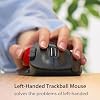
Designed for left-handed users, the ELECOM EX-G offers superior comfort, reducing wrist strain during extended use, making it perfect for professionals or gamers seeking a tailored solution.
Wireless Convenience
With a 2.4 GHz wireless connection, this mouse ensures a reliable, lag-free experience, enabling users to enjoy freedom of movement without the clutter of cables.
Customizable Buttons
Featuring six programmable buttons, users can personalize their workflow, enhancing productivity and efficiency for tasks ranging from gaming to graphic design.
Product Details
- ✅《OPTICAL TRACKING TECHNOLOGY》The ELEOM "EX-G series" trackball provides precise cursor movement for superior accuracy so you can get where you want on the screen quickly with less hand movement, improving productivity and efficiency. This mouse is designed for a LEFT-HANDED person.
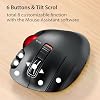
- ✅《FUNCTIONAL 6 BUTTONS》You can assign favorite function to each button by using "ELECOM Mouse Assistant" ELECOM Mouse Assistant Software will be available to download from ELECOM NET website.
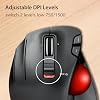
- ✅《DPI CURSOR》Designed with a high-performance gaming optics system sensor and lens. The DPI button can easily change between 750(LOW) and 1500(HIGH) DPI, making the movements of your cursor faster or slower.
- ✅《RED BALL FOR THE BEST OPTICAL TRACKING》 For the tracking accuracy and the best sensor, this item uses a RED BALL. RED COLOR sensing provides more accuracy for current optical tracking technology, a must for high-performance gaming optics system sensors. You will enjoy the results of trackball high performance optical sensors for all movement!!
- ✅《PRODUCT DETAILS》System requirements: Windows Vista, Windows 7, Windows 8, Windows 10 or later (Horizontal scrolling function is not working in Windows RT8.1), macOS 10.10 later, Size: W3.7"(94.7mm) X L4.9"(124.4mm) X H1.9"(47.9mm), Weight: 4.5oz(without battery), DPI: 750/1500 count (switchable), Connectivity: wireless, 1 X AA battery(Included)- Battery Remaining Light Lamp equipped.
| Connectivity Technology | Wireless |
| Additional Features | Ergonomic Design, Programmable Buttons, Wireless |
| Movement Detection | Optical |
| Button Quantity | 6 |
| Hand Orientation | Left |
| Compatible Devices | Personal Computer, Mac, Tablet |
| Operating System | Windows 10, Windows 7, Windows 8, Windows Vista |
| Number of Batteries | 1 AA batteries required. (included) |
| Power Source | Battery Powered |
| Mouse Maximum Sensitivity | 1500 Dots per Inch (3810 cm) |
| Range | 5.0 meters |
| Color | Left Handed |
| Style Name | Wireless_RedBall |
| Enclosure Material | Plastic |
| Brand | ELECOM |
| Antenna Location | Gaming |
| Model Number | M-XT4DRBK-G |
| Are Batteries Included | Yes |
| Are Batteries Required | Yes |
| Manufacturer | ELECOM |
| Mfr Part Number | M-XT4DRBK-G |
| Item Weight | 4.5 Ounces (127.58 grams) |
| Item Dimensions L x W | 3.73"L x 4.9"W (9.5 cm) |
| Unit Count | 1.0 Count |
| Special Feature | Ergonomic Design, Programmable Buttons, Wireless |
| Movement Detection Technology | Optical |
Who Should Buy?

-
Left-Handed Users
This mouse is specifically designed for left-handed individuals, providing ergonomic comfort and intuitive control.
-
Office Workers
Ideal for office tasks, it helps reduce wrist strain and allows for precise cursor control during long hours of use.
-
Gamers
Gamers will appreciate the programmable buttons and thumb control, enhancing their gameplay experience with quick access to functions.

-
Right-Handed Users
Right-handed individuals may find this mouse uncomfortable and less intuitive for their use due to design.
-
Mobile Users
The size and design are less convenient for frequent travel or usage in mobility, making it less portable.
-
Traditional Mouse Users
Users accustomed to standard mice might struggle to adapt to the trackball control and find it less efficient.
Product Description
Have any Query? Chat with us
Customer Questions & Answers
-
Question:
What features make the ELECOM EX-G Left Handed Trackball Mouse ideal for left-handed users?
Answer: The ELECOM EX-G Trackball is specifically designed for left-handed users, featuring a thumb-controlled design that promotes a natural hand position, minimizing strain during use. The ergonomic shape fits comfortably in the left hand, making it suitable for prolonged usage. Additionally, it offers customizable controls with six programmable buttons, allowing users to assign specific functions for increased productivity. This is particularly beneficial for tasks such as graphic design, gaming, or office work where repetitive clicks are common. -
Question:
How does the thumb control on the ELECOM EX-G Trackball enhance productivity?
Answer: The thumb control feature enables precise cursor movement without the need for traditional mouse movements. This results in less hand movement, which can help prevent discomfort during extended computer sessions. With the tracking roller ball, users can easily navigate through large documents or gaming environments seamlessly. It’s perfect for professionals who require precision, such as designers or programmers, as well as gamers looking for a competitive edge without the fatigue from constant mouse movement. -
Question:
Is the ELECOM EX-G Trackball Mouse compatible with all operating systems?
Answer: Yes, the ELECOM EX-G Trackball Mouse is designed for broad compatibility with various operating systems, including Windows and macOS. It connects via a 2.4 GHz USB receiver, which provides a reliable and interference-free connection. Users can easily switch between devices as long as they have USB ports available, making it a versatile option for those who use multiple systems for work or leisure. -
Question:
What are the advantages of using a trackball mouse like the ELECOM EX-G?
Answer: Using a trackball mouse, such as the ELECOM EX-G, offers several advantages, including reduced wrist movement and increased control for cursor navigation. This design minimizes the risk of repetitive strain injuries that can arise from traditional mouse usage. Additionally, the ELECOM trackball provides the flexibility to work in smaller spaces, making it ideal for compact workstations or for users who often travel. Its ergonomic build also ensures comfort throughout lengthy tasks. -
Question:
Can the buttons on the ELECOM EX-G Trackball Mouse be customized?
Answer: Yes, the ELECOM EX-G Trackball Mouse features six programmable buttons that can be customized according to user preferences. This allows individuals to assign specific functions or macros to each button, enhancing their overall workflow. For instance, graphic designers might program shortcuts for frequently used tools, while gamers can set quick-action commands for improved gaming efficiency. Customization ensures that users can tailor the mouse to their specific tasks and enhance their productivity. -
Question:
How does the tilt scroll feature work on the ELECOM EX-G Mouse?
Answer: The tilt scroll feature on the ELECOM EX-G Mouse allows for horizontal and vertical scrolling, which is particularly useful for navigating wide spreadsheets or large web pages. By tilting the mouse, users can easily scroll side to side without having to adjust their cursor. This added functionality streamlines navigation and enhances usability for various applications, including editing documents, browsing the internet, and managing large datasets in a more efficient manner. -
Question:
What is the battery life like on the ELECOM EX-G Trackball Mouse?
Answer: The ELECOM EX-G Trackball Mouse is engineered for longevity, with an efficient power-saving feature that prolongs battery life during use. On average, users can expect extended periods of use before needing to replace batteries. This is especially advantageous for those who rely on a reliable mouse for daily tasks, as it eliminates frequent replacements and provides uninterrupted operation in both work and play scenarios. -
Question:
What types of users would benefit from the ELECOM EX-G Trackball Mouse?
Answer: The ELECOM EX-G Trackball Mouse is ideal for a variety of users, including graphic designers, gamers, office professionals, and anyone looking to enhance their computing experience. Its ergonomic design is especially beneficial for individuals prone to wrist pain or discomfort from conventional mice. Gamers may appreciate the precision and responsiveness of the trackball, while designers benefit from customizable buttons tailored to creative software applications. -
Question:
Does the ELECOM EX-G Trackball Mouse feature any special technology for tracking?
Answer: Yes, the ELECOM EX-G Trackball Mouse utilizes advanced optical tracking technology, ensuring smooth and accurate cursor movements across various surfaces. This technology guarantees that the trackball remains responsive during fast-paced activities, making it particularly appealing for gamers and creative professionals who require precision. Additionally, this tracking technology helps in reducing lag and enhancing overall user experience in both gaming and productivity apps. -
Question:
Where can I buy the ELECOM EX-G Left Handed Trackball Mouse?
Answer: You can buy the ELECOM EX-G Left Handed Trackball Mouse on Ubuy, which offers a user-friendly shopping experience and a wide selection of products. Ubuy ensures that you can easily find the mouse tailored for your left-handed needs, providing detailed product descriptions and customer reviews to help you make an informed decision. Visit Ubuy to explore this fantastic product and enhance your computing setup today!
ELECOM Trackballs M-XT4DRBK-G Editorial Review


The Elecom left-handed trackball mouse is a good option for those suffering from wrist pain, as it helps alleviate stress injuries. However, some customers find it difficult to navigate, and one review mentioned that it stopped working after a short time. The included instructions are also in Japanese, and some users had trouble finding English instructions. The customizable features are helpful, with several buttons, trackball, and scroll wheel. The mouse takes one AA battery and can last between two to three months, and it comes with a small compartment to store the USB dongle when traveling. The software, however, is reportedly limiting and throws up security warnings on Macs.
Customer Reviews & Ratings
4594 customers ratings
-
5 Star
62%
-
4 Star
17%
-
3 Star
8%
-
2 Star
4%
-
1 Star
9%
Review this product
Share your thoughts with other customers
Pros
- Helps alleviate wrist pain and stress injuries
- Several customizable features
- Comes with a compartment for the USB dongle
Cons
- Difficult to navigate and stopped working for some users
Product Price History
Important information
- Limitations : For products shipped internationally, please note that any manufacturer warranty may not be valid; manufacturer service options may not be available; product manuals, instructions, and safety warnings may not be in destination country languages; the products (and accompanying materials) may not be designed in accordance with destination country standards, specifications, and labeling requirements; and the products may not conform to destination country voltage and other electrical standards (requiring use of an adapter or converter if appropriate). The recipient is responsible for assuring that the product can be lawfully imported to the destination country. When ordering from Ubuy or its affiliates, the recipient is the importer of record and must comply with all laws and regulations of the destination country.
- Not all the products listed on Ubuy are for sale, as Ubuy is a global search engine. Products are subject to export/trade regulations.
STD 1344695
Order now and get it around Thursday, June 25
This item is not restrict in my country.(Please click on above link if this item is not restrict in your country, So our team will review and allow.)
QTY:
Secured transaction
Ubuy works hard to protect your security and privacy. Our advanced payment security system ensures confidentiality by encrypting your information during transmission using AES (Advanced Encryption Standards) and SSL (Secure Socket Layer) protocols. Your payment details are 100% secure as we do not share your payment details with third party sellers.
Our Top Logistics Partners
Fastest cross-border delivery
Features & Benefits
- Left-handed trackball mouse
- Optical tracking technology
- 6-button function with scrollwheel tilting
- Customizable button functions
- 750/1500 DPI cursor with interchangeable balls
- Easy maintenance with large artificial ruby ball bearings