- Home Page /
- Electronics /
- Computer Accessories /
- Computer Accessories & Peripherals /
- Input Devices /
- Graphics Tablets /
- Wireless Drawing Tablet XPPen Deco mini7W Gra...
0 ratings


Item #:
75680157
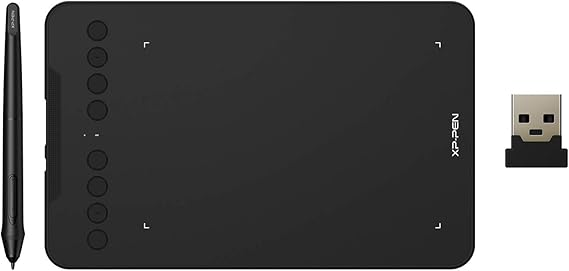
Wireless Drawing Tablet XPPen Deco mini7W Graphic Tablet Pen Tablet with 8192 Levels Pressure, 7 x 4 inch Artist Tablet for Online
Item #:
75680157
STD 4699695
Price Details
Excluding Shipping & Custom charges ( Shipping and custom charges will be calculated on checkout )
*All items will import from US
In stock
 Imported from USA store
QTY:
Order now and get it around Wednesday, June 24
Secured transaction
Ubuy works hard to protect your security and privacy. Our advanced payment security system ensures confidentiality by encrypting your information during transmission using AES (Advanced Encryption Standards) and SSL (Secure Socket Layer) protocols. Your payment details are 100% secure as we do not share your payment details with third party sellers.
Our Top Logistics Partners


Efficient Workflow: With 10 keys and the ability to customize up to 4 sets of shortcuts, the XPPen Wireless Shortcut Remote is a powerful productivity tool for creation, study, work, and gaming

Fast
Shipping

Free
Return*

Secure Packaging

100% Original Products

PCI DSS Compliance

ISO 27001 Certified


Note: Step Down Voltage Transformer required for using electronics products of US store (110-120). Recommended power converters Buy Now.


What Stands Out
Bluetooth Connectivity
Experience seamless wireless drawing with Bluetooth connectivity, allowing artists to work freely without tangled wires while maintaining a stable connection across devices.
X3 Pro Stylus
Equipped with the advanced X3 Pro Stylus, users enjoy precise pressure sensitivity and tilt recognition, enhancing the digital art experience for animation and video editing.
Mini Key-dial
The intuitive mini key-dial speeds up workflows by providing customizable shortcuts at your fingertips, increasing efficiency during long drawing sessions and streamlining creative processes.
Product Details
- Wired and Wireless Connection: Our wireless technology allow the XPPen wireless drawing tablet to connect your PC or laptop by simply plugging the included USB dongle into your computer, the 2.4 GHz wireless technology allows you to create with both speed and freedom
- Battery-Free Pen: The stylus pen in our product is battery-free and offers 8192 levels of pressure sensitivity. It also has tilt-response capabilities and provides smooth tracking without delays, ensuring uninterrupted work for increased efficiency
- 8 Customized Press Keys: The Deco mini7W Wireless Graphics Drawing Tablet features 8 customizable press keys, making it user-friendly and enabling a seamless creative process. Personalize these shortcut keys to enhance your workflow and tailor the experience to your preferences
- Easy Connection: The Deco mini7W supports a USB-C to USB-C connection (with the included adapter), allowing you to connect the tablet to various computing devices depending on your own need
- Wide Compatibility: XPPen Deco mini7W Wireless Graphics Drawing Tablet is compatible with Windows 7 and above, Mac OS X 10.10 (and higher), Android 6.0 (and higher)and mobile phones, Chrome OS 88.0.4324.109 or above
| Brand | XP-Pen |
| Model Name | Deco mini7 wireless |
| Built-In Media | 1x Pen Tablet, 1x Stylus,1x Wireless Receiver, 1x Pen-Clipper, 10x Pen Nibs,1x USB to USB-C Cable, 1x USB to USB-C Adapter, 1x USB to Micro USB Adapter |
| Target Audience | Teacher |
| Model Number | Deco mini7W |
| Manufacturer | XP-PEN |
| Mfr Part Number | Mini7_Wireless |
| Color | Black |
| Connectivity Technology | Bluetooth, USB |
| Pressure Sensitivity | 8192 Levels |
| Operating System | Windows 7 (or later), Mac OS X 10.10 (or later), Android 6.0 (or later), Chrome OS 88 (or later), Linux |
| Additional Features | 60° Tilt Support, Extra-Slim, Shortcut Key |
| Specific Uses For Product | 3D Modelling,Designing,Drawing,E-Signature,Editing, Writing,Gaming,Online Education,Painting,Remote Work,Teaching |
| Compatible Devices | Desktop, Laptop, Smartphone, Tablet |
| Display Type | LCD |
| Native Resolution | 1920x1080 |
| Screen Size | 7 Inches (17.8 cm) |
| Item Weight | 0.56 Kilograms |
| Item Dimensions L x W | 10"L x 7"W (25.4 cm) |
| Active Surface Area | 7.0 |
| Operating System | Windows 7 (or later), Mac OS X 10.10 (or later), Android 6.0 (or later), Chrome OS 88 (or later), Linux See more |
| Special Feature | 60° Tilt Support, Extra-Slim, Shortcut Key |
What's in the box
1x Pen Tablet, 1x Stylus,1x Wireless Receiver, 1x Pen-Clipper, 10x Pen Nibs,1x USB to USB-C Cable, 1x USB to USB-C Adapter, 1x USB to Micro USB Adapter
Who Should Buy?

-
Digital Artists
Ideal for digital artists seeking a responsive tablet with advanced features for creating detailed artwork effortlessly.
-
Animators
Animators will benefit from precise control and quick access to tools, enhancing their ability to create smooth animations.
-
Video Editors
Video editors can utilize the customizable shortcuts and stylus precision for editing and enhancing video projects efficiently.

-
Beginners
Complete beginners might find the advanced features overwhelming and may prefer a more straightforward drawing tablet.
-
Casual Users
Casual users who draw occasionally may not need the advanced capabilities and may opt for simpler options.
-
Budget-Conscious Buyers
Individuals with a tight budget may find this tablet relatively expensive compared to other basic drawing tablets available.
Product Description
Have any Query? Chat with us
Customer Questions & Answers
-
Question:
What are the main features of the XPPen Wireless Drawing Tablet Deco Pro LW 2nd?
Answer: The XPPen Deco Pro LW 2nd offers an 11-inch active area and connects via Bluetooth, making it highly portable and convenient for artists on the go. It comes equipped with the advanced X3 Pro Stylus, known for its precision and 8192 pressure sensitivity levels, allowing for detailed and nuanced artwork creation. Additionally, the Mini Key-dial enables quick access to customizable shortcuts, enhancing workflow efficiency. This tablet is ideal for graphic designers, illustrators, and anyone passionate about digital art. -
Question:
Is the XPPen Deco Pro LW 2nd compatible with different operating systems?
Answer: Yes, the XPPen Deco Pro LW 2nd is compatible with multiple operating systems including Windows, macOS, and certain Linux distributions, as well as Android devices. This wide compatibility ensures that users from various backgrounds can easily integrate the tablet into their existing setups, whether for professional design work or personal art projects. It is particularly beneficial for users who switch platforms frequently. -
Question:
Can I use this tablet for both drawing and photo editing?
Answer: Absolutely! The XPPen Deco Pro LW 2nd is versatile enough for both drawing and photo editing tasks. The high-pressure sensitivity of the X3 Pro Stylus allows artists to create fluid artwork, while software compatibility with major photo editing tools like Adobe Photoshop and CorelDRAW enables detailed editing with precision. This makes it an excellent choice for digital artists who want a tool that can handle a variety of creative tasks efficiently. -
Question:
How does the Bluetooth connectivity work for the Deco Pro LW 2nd?
Answer: The Deco Pro LW 2nd utilizes Bluetooth technology to connect wirelessly to your devices, allowing for a cordless experience that enhances mobility. After pairing with your computer or tablet, you can easily draw without the hassle of cables. This wireless feature is especially useful for artists who prefer a clean workspace or need to move around while working on their art, making it ideal for both home studios and on-location projects. -
Question:
What software is compatible with the XPPen Deco Pro LW 2nd?
Answer: The Deco Pro LW 2nd is compatible with a wide range of software applications across various creative fields. It works seamlessly with industry-standard programs such as Adobe Photoshop, Illustrator, Corel Painter, Clip Studio Paint, and more. Artists can leverage these powerful tools for illustration, graphic design, and animation, which enhances their productivity and creativity. Whether you are a professional or a hobbyist, this compatibility ensures that you have the tools necessary to create remarkable artwork. -
Question:
How portable is the XPPen Deco Pro LW 2nd for travel?
Answer: The compact 11-inch design of the XPPen Deco Pro LW 2nd makes it highly portable and travel-friendly. It can easily fit into most backpacks or laptop bags, allowing artists to take it on the go. Furthermore, the wireless Bluetooth connectivity eliminates the need for bulky cables, the ideal setup for drawing on the road, whether in a café or a gallery. This portability is perfect for traveling artists who want to maintain their creative flexibility. -
Question:
What is the purpose of the Mini Key-dial on this tablet?
Answer: The Mini Key-dial on the XPPen Deco Pro LW 2nd is designed to enhance your workflow by providing quick access to customizable shortcuts. Artists can assign frequently used functions such as zoom, brush sizes, and undo/redo actions to the keys, speeding up the creative process. This feature is especially helpful during intricate tasks, enabling users to maintain focus on their artwork without constant interruptions. It provides a significant boost in overall efficiency, making it a valuable tool for busy professionals. -
Question:
Can I use the XPPen Deco Pro LW 2nd for online teaching or presentations?
Answer: Yes, the XPPen Deco Pro LW 2nd is well-suited for online teaching and presentations. Its precise stylus and smooth drawing surface allow educators to illustrate concepts in real time during virtual classes, making lessons more interactive and engaging for students. Furthermore, its compatibility with various online teaching platforms enhances the educational experience, making it a great tool for teachers looking to incorporate digital drawings or annotations in their lessons. -
Question:
What makes the X3 Pro Stylus unique?
Answer: The X3 Pro Stylus featured with the Deco Pro LW 2nd stands out due to its advanced sensing technology, which provides 8192 levels of pressure sensitivity. This allows for extraordinary accuracy and responsiveness, enabling artists to create subtle gradients and fine lines. Additionally, the stylus does not require charging, making it hassle-free and ready for use whenever creativity strikes. Its features make it a reliable tool for both professional artists and enthusiastic beginners seeking to explore their artistic potential. -
Question:
Where can I buy the XPPen Wireless Drawing Tablet Deco Pro LW 2nd?
Answer: You can purchase the XPPen Wireless Drawing Tablet Deco Pro LW 2nd at Ubuy. They offer a convenient online shopping experience where you can find this tablet along with information about its features, compatibility, and customer reviews. Ubuy's user-friendly interface makes it easy to navigate and find the right product for your creative needs, ensuring that you have a seamless purchasing experience.
XP-Pen Graphics Tablets Deco mini7W Editorial Review


The XPPen Wireless Drawing Tablet Deco Pro MW 2nd is a solid performing drawing tablet with a good entry-level price point. The build quality of the tablet is superb and feels like a premium product. The tablet's low profile and curved edge make it comfortable to use, especially for longer drawing sessions. One standout feature is the included pen case, which is convenient for storing and organizing the pen and different tips. The stylus itself is sensitive and responsive, with 16k levels of pressure sensitivity. However, the reviewer notes that they primarily use the bottom half of the pressure curve, so the necessity of 16k levels is questionable. The tablet is easy to install and set up, and switching from a different brand's tablet was a smooth transition. The reviewer also mentions that their previous Wacom stylus works with this tablet, which is a bonus. There are a couple of minor drawbacks mentioned in the review. The tablet's power button requires a longer press (nearly 4 seconds) to turn it on and off, which the reviewer finds inconvenient. Additionally, after a month of use, there was interference between the tablet's stylus and the reviewer's mouse. Disconnecting and reconnecting the tablet resolved the issue, but it was still a surprising inconvenience. In conclusion, the XPPen Wireless Drawing Tablet Deco Pro MW 2nd is praised for its build quality, comfort, and responsive stylus. It offers good value for its price point and is a solid choice for entry-level users.
Customer Reviews & Ratings
842 customers ratings
-
5 Star
65%
-
4 Star
16%
-
3 Star
10%
-
2 Star
3%
-
1 Star
6%
Review this product
Share your thoughts with other customers
Pros
- Superb build quality
- Comfortable low profile and curved edge design
- Included pen case for storage and organization
- Sensitive and responsive stylus
- Easy installation and compatibility with other brand's stylus
Cons
- Longer press required for power button
Product Price History
Important information
- Limitations : For products shipped internationally, please note that any manufacturer warranty may not be valid; manufacturer service options may not be available; product manuals, instructions, and safety warnings may not be in destination country languages; the products (and accompanying materials) may not be designed in accordance with destination country standards, specifications, and labeling requirements; and the products may not conform to destination country voltage and other electrical standards (requiring use of an adapter or converter if appropriate). The recipient is responsible for assuring that the product can be lawfully imported to the destination country. When ordering from Ubuy or its affiliates, the recipient is the importer of record and must comply with all laws and regulations of the destination country.
- Not all the products listed on Ubuy are for sale, as Ubuy is a global search engine. Products are subject to export/trade regulations.
STD 4699695
Order now and get it around Wednesday, June 24
This item is not restrict in my country.(Please click on above link if this item is not restrict in your country, So our team will review and allow.)
QTY:
Secured transaction
Ubuy works hard to protect your security and privacy. Our advanced payment security system ensures confidentiality by encrypting your information during transmission using AES (Advanced Encryption Standards) and SSL (Secure Socket Layer) protocols. Your payment details are 100% secure as we do not share your payment details with third party sellers.
Our Top Logistics Partners
Fastest cross-border delivery
Features & Benefits
- Efficient workflow with customizable shortcuts
- 10 keys for quick actions
- Ideal for creation, study, work, and gaming
- Enhanced productivity tool
- Provides flexibility and convenience
- Supports multiple sets of shortcuts for different tasks