- Home Page /
- Office Products /
- Office Electronics /
- Point-of-Sale (POS) Equipment /
- Receipt Printers /
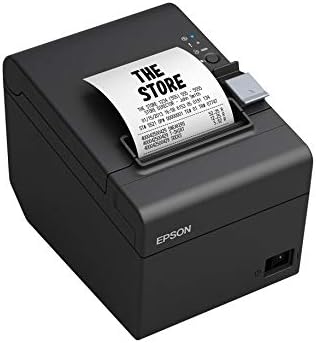
- Epson TM-T20III,Monochrome Thermal POS Printe...
0 ratings



Item #:
39390241
Epson TM-T20III,Monochrome Thermal POS Printer C31CH51001
87% of respondents would recommend this to a friend
Item #:
39390241
STD 8288630
Price Details
Excluding Shipping & Custom charges ( Shipping and custom charges will be calculated on checkout )
*All items will import from US
0 ratings
Write a review
100+ bought
In stock
 Imported from USA store
QTY:
Order now and get it around Wednesday, November 11
Secured transaction
Ubuy works hard to protect your security and privacy. Our advanced payment security system ensures confidentiality by encrypting your information during transmission using AES (Advanced Encryption Standards) and SSL (Secure Socket Layer) protocols. Your payment details are 100% secure as we do not share your payment details with third party sellers.
Our Top Logistics Partners


Fast
Shipping

Free
Return*

Secure Packaging

100% Original Products

PCI DSS Compliance

ISO 27001 Certified



Note: Step Down Voltage Transformer required for using electronics products of US store (110 V-120 V). Recommended power converters Buy Now.


What Stands Out
Fast Printing Speed
Delivers high-speed printing of receipts and tickets at 200 mm/sec, enhancing customer service efficiency and ensuring quick transactions in busy retail environments.
Compact Design
Space-saving design ideal for small counters, making it easy to integrate into existing retail setups while maintaining a sleek and professional appearance.
Easy Maintenance
User-friendly maintenance features, including drop-in paper loading and a built-in auto cutter, reducing downtime and simplifying everyday operations for busy retailers.
Product Details
| Brand | Epson |
| Connectivity Technology | USB |
| Printing Technology | Thermal |
| Special Feature | Auto-cutter life - 1.5 million cuts, Enhanced print options - reduce paper usage up to 30 percent, Fast print speeds - up to 250 mm/sec, Reliable printhead - 150 km/150 million pulses, Thermal printer designed with the reliability and flexibility that retailers need See more |
| Color | Black |
| Model Name | EPTMT20III |
| Printer Output | Monochrome |
| Maximum Print Speed (Color) | 6 |
| Max Printspeed Monochrome | 7 |
| Package Weight | 6 Pound |
Who Should Buy?

-
Retail Businesses
Ideal for retail environments needing efficient, reliable transaction printing with fast print speeds and low operating costs.
-
Food Service
Perfect for restaurants and cafés that require quick printing of receipts in a compact, easy-to-use format.
-
Small Enterprises
A cost-effective printing solution for small businesses looking for straightforward setup and low maintenance requirements.

-
Large Scale Operations
Not suitable for high-volume printing needs found in large enterprises requiring faster printing or more robust features.
Product Description
Have any Query? Chat with us
Customer Questions & Answers
-
Question:
How to Shop Epson TM-T20III,Monochrome Thermal POS Printer Online From Ubuy?
Answer: It’s easy to shop Epson TM-T20III,Monochrome Thermal POS Printer online from Ubuy. You just have to search for the product, choose your shipping method while checking out and get it delivered to your location. -
Question:
Is Epson TM-T20III,Monochrome Thermal POS Printer Available to Shop Online in São Tomé and Príncipe?
Answer: Yes, at Ubuy São Tomé and Príncipe this product is available for you to shop at a reasonable price. The Epson TM-T20III,Monochrome Thermal POS Printer is not available locally but you can trust us with our express shipping services. -
Question:
How Long Does It Take to Get Product After Placing the Order?
Answer: The delivery time of your ordered product varies as per what you've ordered and the shipping method that you've chosen. The estimated delivery time is mentioned during the checkout process, so be carefree while shopping.
Epson Receipt Printers Editorial Review
Epson TM-T20III, Monochrome Thermal POS Printer C31CH51001 is a versatile thermal printer designed specifically for retail and hospitality environments. Users have praised its fast print speeds, reaching up to 250 mm/sec, which is crucial in busy settings. Many have found it easy to set up and compatible with various software, making it a popular choice for food trucks and retail setups. However, some users reported occasional connectivity issues, although they were generally resolved by restarting the printer. Overall, the TM-T20III strikes a good balance between reliability and performance, making it an excellent asset for any merchant.
Customer Reviews & Ratings
1 customers ratings
-
5 Star
100%
-
4 Star
0%
-
3 Star
0%
-
2 Star
0%
-
1 Star
0%
Review this product
Share your thoughts with other customers
Pros
- Fast print speed of up to 250 mm/sec
- Easy to set up right out of the box
- Compatible with various POS systems
- Supports enhanced print options for efficiency
- Reliable with a long auto-cutter life
Platform Trust & Buyer Confidence

BS
Beat
Verified buyer
“Simple process, tax and import duties announced by email. Paid online. Delivery was quick. Can recommend.”
22 October 2026 · via Trustpilot
S
Songpon
Verified buyer
“The product met my expectations perfectly. The ordering process was convenient and easy, and I was kept updated on the delivery status throughout the shipping process. The delivery was also very fast. I can confidently confirm that Ubuy provides an excellent shopping and delivery experience. Highly recommended! From Thailand”
22 October 2026 · via Trustpilot
D
Dimitra
Verified buyer
“Quick and efficient delivery and the possibility to get the package delivered from a pick-up point. I'm very happy with my experience and would recommend it again!”
22 October 2026 · via Trustpilot
HJ
Heer
Verified buyer
“My product came in good condition from the USA. I was happy that I could buy via this Chanel and that DHL brought it to my house. The communication is fine. The charger works very well. Fast and my Samsung watch and Samsung airbuds and Samsung Fold 8 Ultra all charge fast.”
22 October 2026 · via Trustpilot
SF
Sergey
Verified buyer
“Hello Ubuy team, thank you so much for the excellent service! I received the package today; it arrived in great condition and was packed very neatly. The delivery was fast, and the courier was very friendly as well. Wishing continued success to Ubuy and the entire team!”
23 October 2026 · via Trustpilot
WHY SHOP WITH US
Secure Checkout
Global Delivery
Easy Returns
Genuine Products
Product Price History
Important information
- Limitations : For products shipped internationally, please note that any manufacturer warranty may not be valid; manufacturer service options may not be available; product manuals, instructions, and safety warnings may not be in destination country languages; the products (and accompanying materials) may not be designed in accordance with destination country standards, specifications, and labeling requirements; and the products may not conform to destination country voltage and other electrical standards (requiring use of an adapter or converter if appropriate). The recipient is responsible for assuring that the product can be lawfully imported to the destination country. When ordering from Ubuy or its affiliates, the recipient is the importer of record and must comply with all laws and regulations of the destination country.
- Not all the products listed on Ubuy are for sale, as Ubuy is a global search engine. Products are subject to export/trade regulations.
STD 8288630
Order now and get it around Wednesday, November 11
This item is not restrict in my country.(Please click on above link if this item is not restrict in your country, So our team will review and allow.)
QTY:
Secured transaction
PCI DSS compliant and ISO 27001:2022 certified, with encrypted payments and full buyer protection on every order.
Our Top Logistics Partners
Fastest cross-border delivery
Ubuy Assurance
Experience worry-free shopping with 100% original products, PCI DSS-compliant payment security, ISO 27001-certified data protection, the fastest cross-border delivery, free returns *, and secure packaging on every order.