0 ratings

Item #:
67492165
iDsonix USB 3.0 Switch 1 in 2 Out2 in 1 Out Bi-Directional, USB Switch 2 Computers Share 1 Device for Printer,Scanner,Keyboard, USB Sharing Switch
Item #:
67492165
STD 639840
Price Details
Excluding Shipping & Custom charges ( Shipping and custom charges will be calculated on checkout )
*All items will import from US
0 ratings
Write a review
In stock
 Imported from USA store
QTY:
Order now and get it around Monday, July 06
Secured transaction
Ubuy works hard to protect your security and privacy. Our advanced payment security system ensures confidentiality by encrypting your information during transmission using AES (Advanced Encryption Standards) and SSL (Secure Socket Layer) protocols. Your payment details are 100% secure as we do not share your payment details with third party sellers.
Our Top Logistics Partners


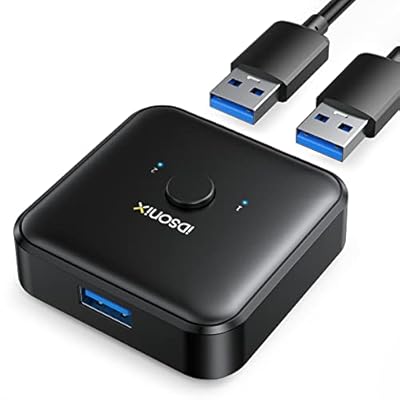
One click to switch connection status, this compact USB 3.0 Switcher allows you to share a USB device such as printer, scanner, mouse, keyboard, card reader, flash drive and other USB device between 2 computers.

Fast
Shipping

Free
Return*

Secure Packaging

100% Original Products

PCI DSS Compliance

ISO 27001 Certified


Note: Step Down Voltage Transformer required for using electronics products of US store (110-120). Recommended power converters Buy Now.


What Stands Out
Bi-Directional Switching
Easily switch between two computers sharing one device, simplifying access to printers and scanners without the need to plug and unplug constantly.
High-Speed USB 3.0
Leverages USB 3.0 technology for rapid data transfer speeds, ensuring efficient and smooth operation of connected devices without lag or delay.
Complete Package
Includes two A to A 3.3ft cables, providing everything needed for immediate setup, saving time and effort while ensuring compatibility with your devices.
Product Details
- Allows sharing of USB devices like printers, scanners, keyboards, and more between 2 computers
- Supports USB 3.0 data transfer speeds up to 5Gbps, backward compatible with USB 2.0 and USB 1.1
- Enables connecting 2 computers with 1 keyboard or sharing 1 printer for efficient work and tidier desktop
- Driver-free for Windows, Mac OS, Linux with plug and play functionality, LED indicators show usage status
- Material: ABS, Color: Black, Dimensions: 5.54cm x 5.54cm x 1.95cm, Weight: 30g
- Input/Output port: USB-A 3.0 x 3, ensures ultra-high-speed data transfer
| Item Weight | 0.7 lbs (320 grams) |
Who Should Buy?

-
Office Users
Ideal for professionals needing to share printers or scanners between multiple computers efficiently.
-
Home Setups
Perfect for families wanting to connect various USB devices to different home computers without constant re-plugging.
-
Tech Enthusiasts
Great for gadget lovers who frequently switch between devices, simplifying the connection of USB peripherals.

-
Game Console Users
Not suitable for users wanting to share gaming consoles, as it is designed for USB peripherals only.
-
Streaming Professionals
Not the best choice for streamers who require high-speed dedicated connections without interruptions or switching delays.
-
Heavy Data Users
May not be ideal for users transferring large files regularly, as potential speed limitations exist with USB switching.
Product Description
iDsonix USB 3.0 Switch 1 in 2 Out2 in 1 Out Bi-Directional, USB Switch 2 Computers Share 1 Device for Printer,Scanner,Keyboard, USB Sharing Switch with 2pcs A to A 3.3ft Cables
Have any Query? Chat with us
Customer Questions & Answers
-
Question:
What devices can I connect using the iDsonix USB 3.0 switch?
Answer: The iDsonix USB 3.0 switch can connect various devices such as printers, scanners, keyboards, and other USB peripherals. This allows multiple computers to share a single device seamlessly. For example, if you have one printer and two computers, the switch lets either computer access the printer without needing to swap cables. This features make it ideal for both home and office environments. -
Question:
How does the bi-directional switching work?
Answer: The bi-directional switching feature means that you can connect two computers and one USB device, or one computer and two USB devices. You simply toggle between the computers with a button on the switch. This design is perfect for users who need to share equipment like printers or keyboards between different systems without dealing with multiple setups, enhancing versatility and productivity. -
Question:
Is the iDsonix USB switch compatible with all operating systems?
Answer: Yes, the iDsonix USB switch is designed to be compatible with various operating systems, including Windows, macOS, and Linux. This broad compatibility ensures that users from diverse backgrounds can utilize the switch without worrying about specific system requirements. It’s especially useful for multi-platform users who work with different systems in their daily tasks. -
Question:
Can I use the iDsonix switch with USB 2.0 devices?
Answer: Absolutely! The iDsonix USB 3.0 switch is backward compatible with USB 2.0 devices. This means that even if you have older USB peripherals, you can still use them with this switch. This feature helps protect your investment, ensuring that older technology remains functional alongside newer USB upgrades, making it a practical choice for those transitioning to newer devices. -
Question:
How does this switch help in a multi-computer setup?
Answer: In a multi-computer setup, the iDsonix USB switch allows you to manage multiple machines without the clutter of excessive wiring. By using a single set of peripherals for two computers, you minimize desk clutter and streamline workflow. For instance, this is particularly beneficial in office environments where space is limited, or for users who prefer a tidy workspace. -
Question:
What cables are needed to use the iDsonix USB switch?
Answer: To use the iDsonix USB switch, you require standard USB cables to connect your computers and the USB device. These cables typically come included when you purchase the peripherals. Ensure you're using USB 3.0 cables for optimal performance, particularly if you're handling data-intensive tasks like printing documents or transferring files. This attention to detail improves overall efficiency. -
Question:
Is there a button to switch between computers?
Answer: Yes, the iDsonix USB switch features a physical button that allows you to easily switch between the two connected computers. This user-friendly design is intuitive and eliminates the hassle of disconnecting cables manually. It’s especially useful in fast-paced environments where quick transitions between systems are necessary for workflow efficiency and productivity. -
Question:
Can I use this switch with a laptop and desktop simultaneously?
Answer: Certainly! The iDsonix USB switch can connect a laptop and a desktop simultaneously, allowing you to control shared devices such as a keyboard or printer from either machine. This is perfect for users who switch between working on different devices while maintaining access to essential peripherals, making your workstation more adaptable and efficient. -
Question:
Does the iDsonix USB switch require any software installation?
Answer: No, the iDsonix USB switch operates as a plug-and-play device, meaning it does not require any software installation for it to function. Simply connect the switch to your computers and the USB device, and you are ready to go. This feature enhances user-friendliness, eliminating the need for additional setup and allowing immediate usage right out of the box. -
Question:
Where can I buy the iDsonix USB 3.0 Switch?
Answer: You can purchase the iDsonix USB 3.0 Switch from Ubuy in São Tomé and Príncipe. Ubuy offers a reliable platform to find this product along with other tech accessories, ensuring you receive quality goods with consistent customer service. They often have a variety of options, making it easier to select the one that matches your needs and preferences.
iDsonix KVM Switches Editorial Review
No editorial reviews found
Customer Reviews & Ratings
1 customers ratings
-
5 Star
100%
-
4 Star
0%
-
3 Star
0%
-
2 Star
0%
-
1 Star
0%
Review this product
Share your thoughts with other customers
Product Price History
Important information
- Limitations : For products shipped internationally, please note that any manufacturer warranty may not be valid; manufacturer service options may not be available; product manuals, instructions, and safety warnings may not be in destination country languages; the products (and accompanying materials) may not be designed in accordance with destination country standards, specifications, and labeling requirements; and the products may not conform to destination country voltage and other electrical standards (requiring use of an adapter or converter if appropriate). The recipient is responsible for assuring that the product can be lawfully imported to the destination country. When ordering from Ubuy or its affiliates, the recipient is the importer of record and must comply with all laws and regulations of the destination country.
- Not all the products listed on Ubuy are for sale, as Ubuy is a global search engine. Products are subject to export/trade regulations.
STD 639840
Order now and get it around Monday, July 06
This item is not restrict in my country.(Please click on above link if this item is not restrict in your country, So our team will review and allow.)
QTY:
Secured transaction
Ubuy works hard to protect your security and privacy. Our advanced payment security system ensures confidentiality by encrypting your information during transmission using AES (Advanced Encryption Standards) and SSL (Secure Socket Layer) protocols. Your payment details are 100% secure as we do not share your payment details with third party sellers.
Our Top Logistics Partners
Fastest cross-border delivery
Features & Benefits
- Share a USB device between 2 computers with one click
- Supports USB 3.0 data transfer for speeds up to 5Gbps
- Tidier desktop and more efficient work
- Driver-free for Windows, Mac OS, Linux
- LEDs show the usage status
- Recommended to connect this switcher to your computer using 1m cables